
The difficult question behind a Black Friday promotion is often less about setting up the discount than deciding whether it is worth offering. More orders after a storewide price cut might reflect the discount, higher advertising spend, seasonal demand, or customers who would have purchased anyway. A healthier revenue figure does not necessarily mean a more profitable promotion.
On October 2, 2026, Shopify announced that discounts could be included in Rollouts. Merchants can offer a new promotion to part of their online store traffic, compare it with existing offers, or coordinate discounts with theme and checkout changes. That creates a useful starting point: validate the offer before deciding whether to expand it for Black Friday. Official announcement
The home storage store below is a teaching example, not a real project or a measured result. Documentation was checked on October 20, 2026.
Check the plan, then choose the right type
Rollouts currently require Basic or higher, while Experiments with a control group require Grow or higher. Staff need Rollouts permissions and the permissions for the resources they change, such as Discounts. Seeing the feature in the store does not establish that every team member can manage it. Plan and permission requirements
The three types serve different purposes:
- Experiment: compare the existing experience with a treatment to understand whether a change helps.
- Event: publish changes for a defined period and roll them back when it ends.
- Launch: merge changes into the store permanently when they are intended to stay.
These are not three mandatory stages of a campaign. Even if an offer performs well in a test, an Event may still be the appropriate choice for the actual Black Friday sale. A successful test is not a reason to keep the discount indefinitely. Rollouts overview
Make sure the groups actually receive different offers
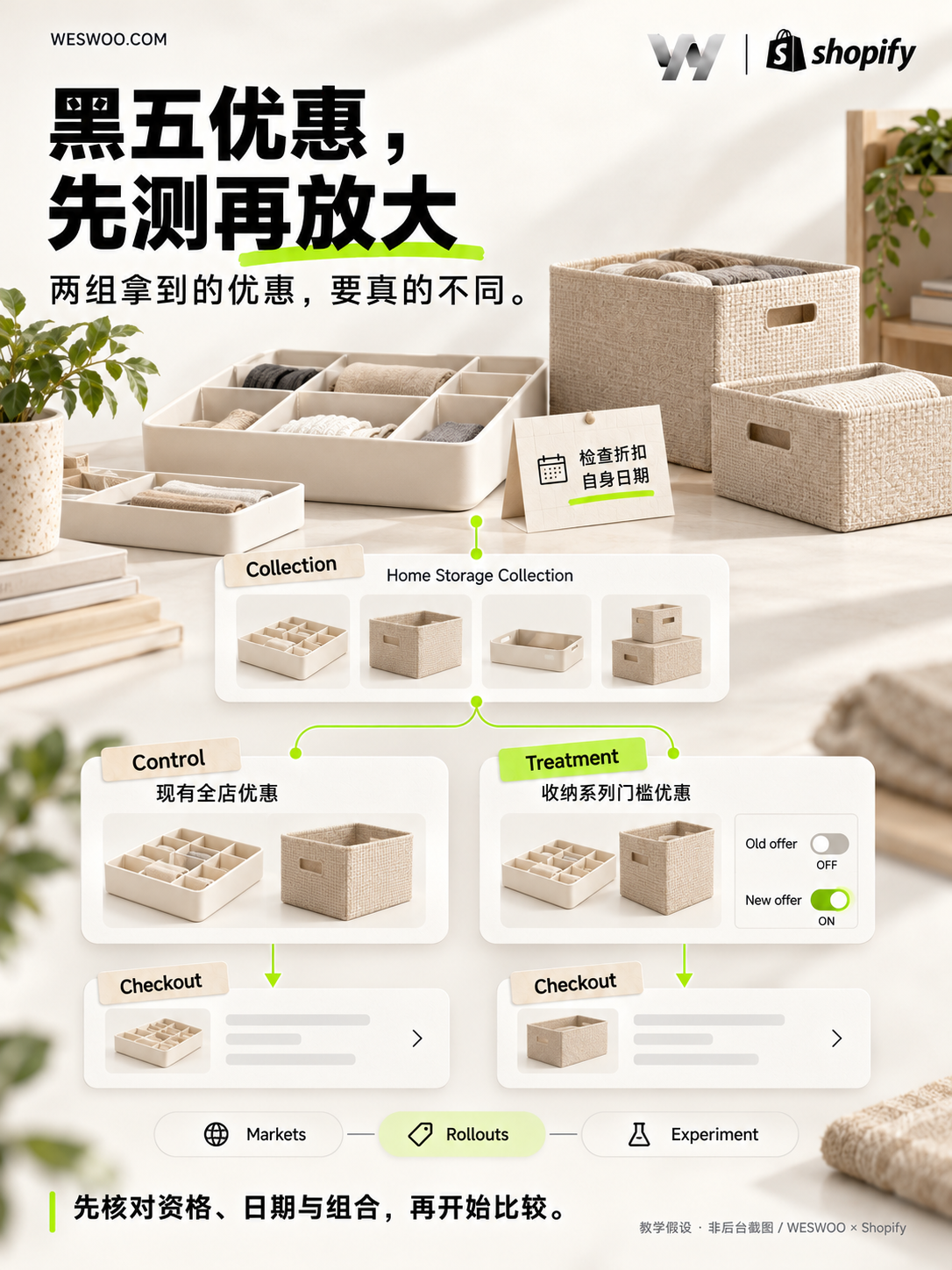
Suppose a store sells drawer dividers, wardrobe storage boxes, and shelving. It normally runs an automatic discount across the store. Before Black Friday, the merchant wants to compare broad discounting with an offer limited to qualifying purchases from the storage collection above a purchase threshold.
The business hypothesis is that a threshold could encourage customers to buy everything they need together. It could also discourage someone who wants only one drawer divider. Whether it produces more valuable orders needs to be tested; it should not be presented as a proven way to raise order value while protecting profit.
In Rollouts, the Control follows the store’s existing discount behavior. It is not a separate arm to which the merchant arbitrarily assigns another coupon. In this example, the existing automatic discount provides the baseline. The Treatment can deactivate that discount and activate the new collection offer. This compares two policies, rather than comparing the existing promotion with an extra discount stacked on top. Discount changes and the control group
A discount can be available through its own dates or through a serving Rollout’s activation, even outside those dates. A Treatment that deactivates it blocks it for that group even while the original dates are valid. Check both the native schedule and each arm’s actions: an offer already active in its own right can also reach Control. Independent discount and Rollout schedules
Existing customer eligibility still applies. Being included in an Experiment does not automatically qualify a customer for the discount. Customer eligibility
Configure the rules, then explain the threshold accurately
Prepare the eligible collection, exclusions, purchase threshold, discount value, customer eligibility, and allowed combinations. Go to Discounts → Create discount → Amount off products → Automatic discount. Select the collection, configure Minimum purchase amount, and review Active dates. Automatic product discount setup
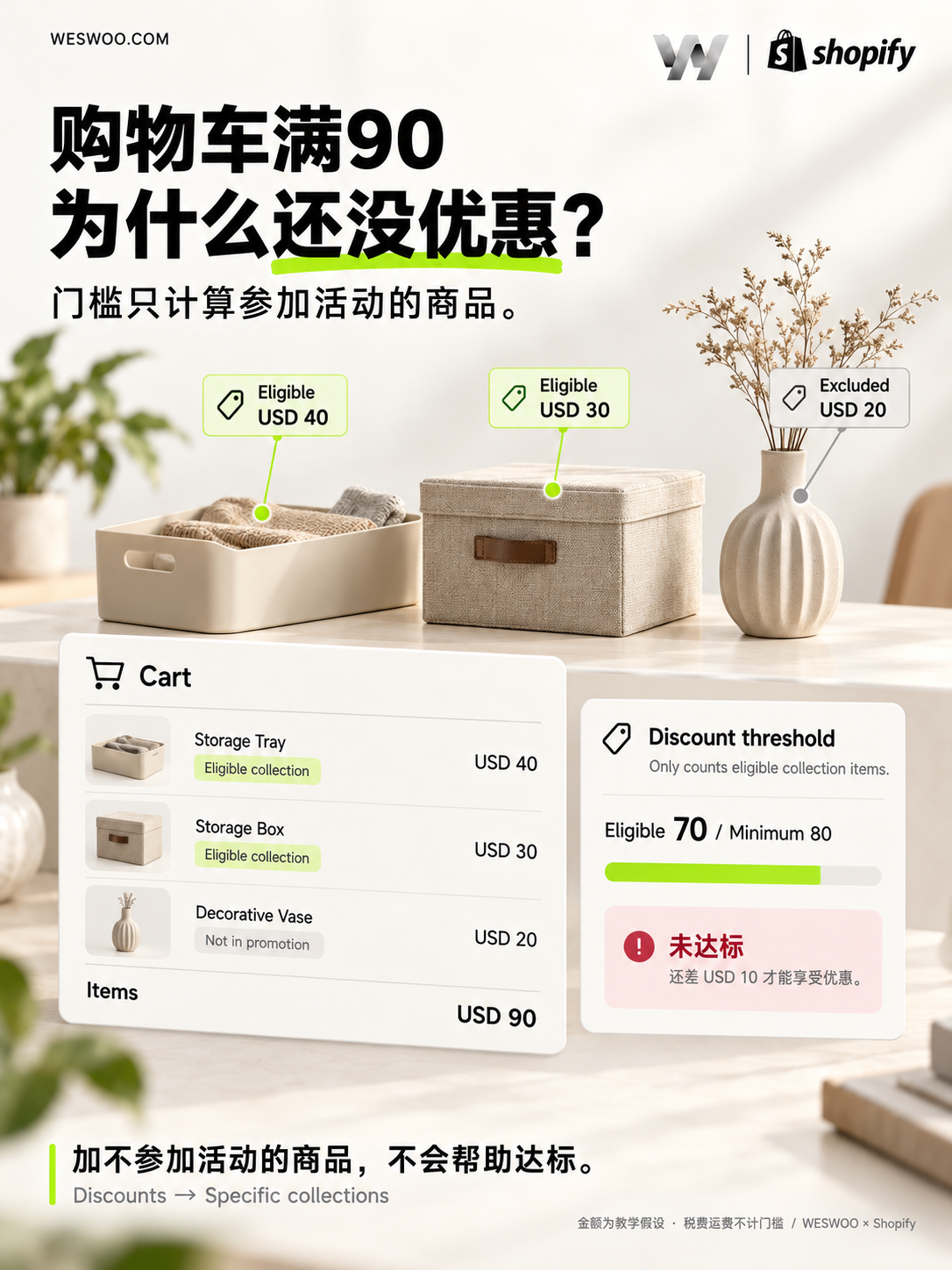
One detail matters directly to the storefront: when a product discount applies to a particular collection, only eligible products count toward its threshold. Shipping and taxes do not count. If a customer adds a storage box and an excluded decorative item, the Cart’s total is not sufficient evidence that the promotion’s threshold has been met. Minimum purchase calculations
A real storefront: keep separate offers separate
McGee & Co. offers a useful real storefront example. Its event page separates a dining-category discount from a free-shipping message for qualifying decor orders, with the promotion linking to a specific collection. Shoppers can follow the scope rather than infer a blanket sitewide promise. View the event page; Shopify’s brand case study.
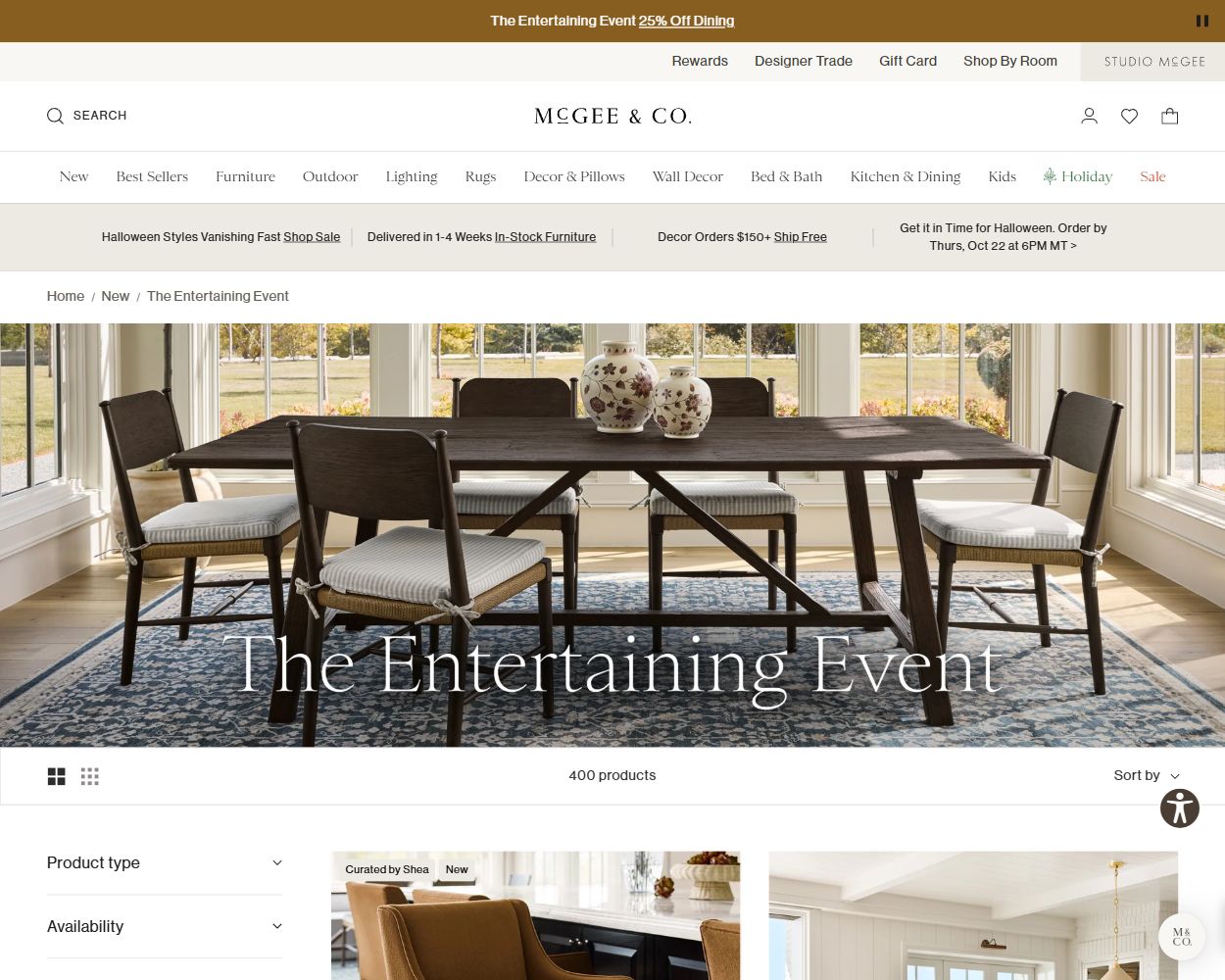
Its shipping policy adds the operational detail: eligible decor needs a $150.01 subtotal after discounts for free shipping, while shipping for certain furniture and other categories is calculated on pre-discount retail prices. The useful design principle is the hierarchy: a clear entry message, followed by eligibility and calculation details. These are public-page observations made on October 20, 2026, not evidence that McGee & Co. uses Rollouts, a WESWOO client claim, or proof of experiment results. Shipping policy
Next, go to Markets → Rollouts → Create rollout, choose Experiment, and add the activation and deactivation under Add changes → Discounts. Review Audience, Traffic allocation, and the Control / Treatment Traffic split before setting the dates. Allocation determines the participating audience; the split then divides that audience. Scheduling uses the store’s timezone, and conflict notices need attention before saving. Creation and configuration
If offers can combine, inspect their Combinations settings individually. Shopify requires the relevant discounts to permit the combination; selecting an option only on the new offer does not establish that every combination will work. Include excluded products in the test cart and continue through checkout to verify the actual result. Discount combinations and testing
The campaign page should explain qualifying products, the threshold, and restrictions. Cart messages must agree with Checkout. If the experiment changes the campaign page, product presentation, and discount together, its result describes that combined promotional experience. It cannot assign the entire difference to the discount level. To investigate the offer itself, keep other conditions as consistent as possible and avoid repeatedly changing copy, rules, and advertising structure while the test runs.
Theme work has boundaries too. Rollouts do not support vintage themes, and Liquid templates cannot be changed as part of a Rollout. New components or business logic need an appropriate development process first, followed by a decision about how they fit into the campaign. Rollouts should not be treated as a release branch for arbitrary code changes. Theme limitations
An offer for part of the audience is not a promise to every channel
An experiment inside the store can conflict with an advertisement promising the same promotion to everyone. A customer clicks through and lands in the group that does not receive it.
Shopify explains that Experiments and Events reaching only part of the audience apply to the online store. In particular, when Catalog changes affect prices or product availability, ads, listings, and feeds do not receive equivalent experimental information. Mismatched offers can trigger channel reviews. Even a full rollout does not make every external system update at the same instant. Audience reach and external channels
Check whether the products under test appear in Google, Meta, or other product advertising. Where necessary, pause the affected ads or remove those products from listings during the test. Ordinary social content should also avoid promising every visitor an experimental offer. A smaller audience does not automatically remove channel risk.
There is a related integration check. A campaign banner, email tool, or third-party discount app might read only a discount’s ACTIVE status. That status no longer necessarily describes what a visitor can use. Admin API 2026-10 adds read-only Discount.rollouts information, which requires the relevant access permissions. Integrations should consider the Rollout’s actual state, effective allocation, and treatment behavior rather than relying on an old cached discount record. Discount integration upgrade guide
Conversion answers one question; gross profit answers another

First identify which funnel stage a result describes. More visitors reaching checkout and a higher completed-purchase rate are different changes. Rollouts metrics depend on the resource and type, and cover the online store, Cart, and Checkout. They do not provide discount-specific revenue or order attribution. Assignments and exposures are not the same as customers actually using the promotion. Analytics scope and limitations
Return to the home storage store. Suppose the threshold encourages customers to buy several items, but the additional items are bulky and costly to ship. Average order value alone could suggest the wrong decision. First examine gross profit: net sales, already reflecting period discounts and refunds, minus product costs. Then assess fulfillment, payment and advertising costs, and unresolved return or refund timing differences. Do not deduct the same refund twice. Shopify’s profit reporting depends on Cost per item being recorded when the product is sold. Missing costs prevent those reports from covering the complete product range. Profit reporting definitions
A rise in storewide gross profit still does not prove that the Treatment performed better. Native Rollouts Analytics do not automatically provide a profit ledger by experimental group. Without a validated link between groups and orders, report the experiment’s conversion changes separately from business-level profit observations. Orders using a discount code are not a substitute for the entire treatment group, and a before-and-after comparison is not proof of causality.
Before starting, agree on the question, observation period, primary metric, and stopping conditions. When traffic is limited, results fluctuate, or inventory and advertising change materially, an honest conclusion that the evidence is insufficient is more useful than rushing to name a winner. These are experiment design recommendations, not universal sample-size requirements or winning thresholds published by Shopify.
Acceptance testing continues after the sale ends
Record effective traffic while the test runs and watch for overlapping Rollouts. Configured allocation can differ from the effective allocation. When ending an active Rollout, the admin offers Roll back changes or Apply changes. Applying changes permanently should not be expected to reverse automatically; permanently applying a discount activation also removes its end date. Managing and ending Rollouts
For a limited Black Friday campaign, acceptance checks should cover the period before launch, the live campaign, and the period after it ends. Eligible products should receive the correct offer, excluded products should not help meet the threshold, and the page promise should match checkout. Banners, Cart messages, and discount behavior should return to their intended states afterwards. In particular, the end of an Experiment does not mean every native discount has expired: the outcome still depends on the underlying discounts’ own schedules.
WESWOO’s page design and development work can be organized around these concrete deliverables: explaining eligible products and thresholds, making promotional components reflect the right business state, checking the journey from campaign page to checkout, and recording launch, end-of-sale, and rollback acceptance results. Merchants decide their discount policy. Design and development make the promise customers see hold true, while testing informs the next decision instead of merely justifying the current sale.