
A customer is upgrading an office wireless network. They understand the WiFi 7 label but do not know whether their existing switch can power the new access point. Another customer wants to connect a monitor to a laptop. They see a USB-C socket and add an adapter to their cart.
These hypothetical situations point to a practical responsibility for a technology store: explain a product’s capabilities as purchase conditions for the customer’s existing equipment and intended use.
Photography shows the product. Specifications describe its capabilities. A selection experience connects both to a customer’s question: How will this work with what I already own? What else do I need, and what must I check first?
The official public documentation for UniFi U7 Pro and Framework Laptop 13 offers useful examples. We will examine those examples and then apply the lessons to Shopify product data, interactions, and acceptance checks. These are public product references. The merchant workflows below are teaching proposals, not projects for these brands, and they do not establish that either brand uses Shopify.
Separate power requirements from network capability
Imagine a small office that already has Ethernet cabling and a switch. Its purchasing team wants to add wireless access points. A page dominated by wireless standards and photography still leaves practical questions: Does the connection supply power? Is the existing equipment suitable? Is the purchasing list complete?
The U7 Pro specification page lists Uplink and Power Method separately as 2.5 GbE and PoE+. They answer different questions: one describes the network uplink capability; the other identifies the power method. Official U7 Pro specifications
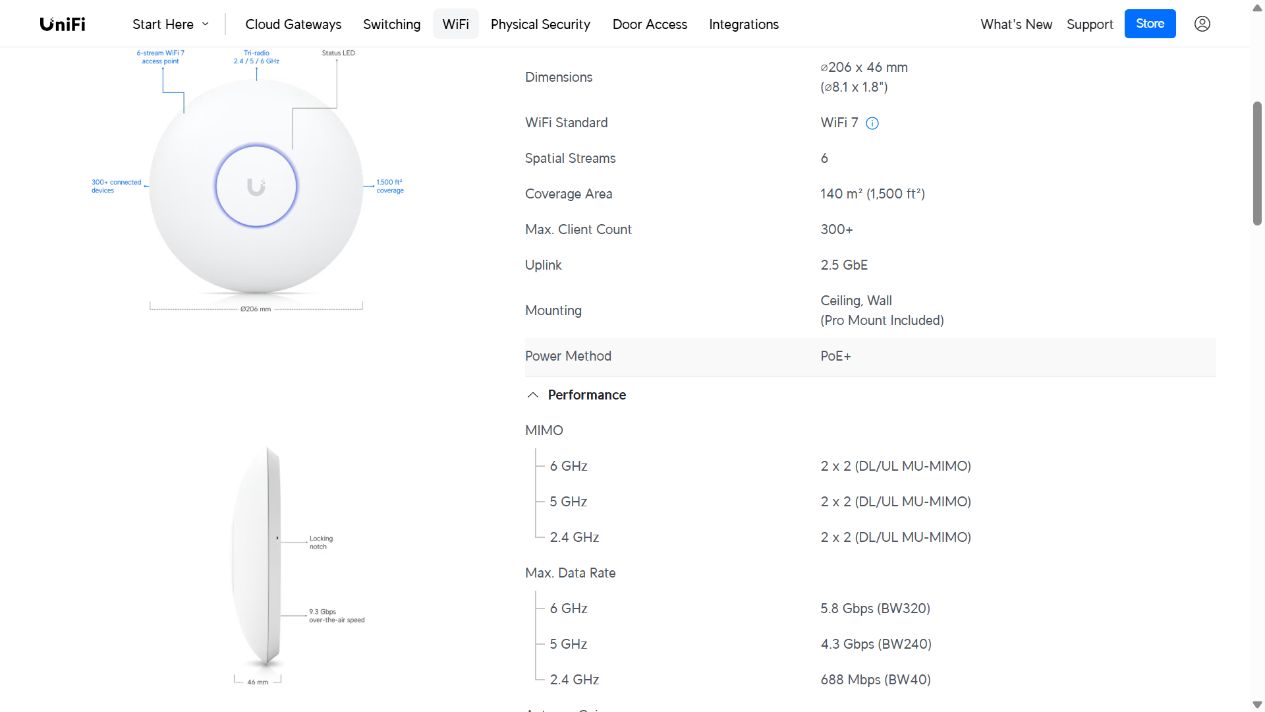
Case image: an actual Ubiquiti page screenshot observed on October 28, 2026. Original product information is retained for analysis of its organization. Source.
A merchant can turn those separate facts into questions a customer can answer.
Start with power. Which switch or power device will you use? “It has an Ethernet port” is insufficient. Check the exact model, the intended port, and its power documentation. For multiple devices, check the available power budget as well. If the customer does not know the model, show where to find its label and provide a support route. Do not display a compatibility confirmation.
Then ask about the intended result. A customer hoping to use the 2.5 GbE uplink capability needs to check the connected port and network path. Requirements for a desired capability should not become an instruction to buy a faster switch in every situation. Nor should a wireless rate or nominal port speed become a promise of internet download performance.
The purchase area can show a short power condition and a separate explanation of what affects the intended performance. Detailed installation and specification information can follow for readers who need it.
This gives the purchasing team a useful next action while allowing experienced buyers to proceed without completing an introductory questionnaire.
Match similar connectors to the exact device version
Laptop accessories create another easy misunderstanding: a plug fits, so every function is expected to work.
Framework’s official USB matrix separates laptop generations. For the Laptop 13 AMD Ryzen 7040 Series, ports 1 and 3 are listed as USB4, while ports 2 and 4 are USB 3.2 Gen2x1. Port 2 has None in the Display column; the other three list display output. These are generation-specific facts, not a rule for every Laptop 13. Official Framework port matrix
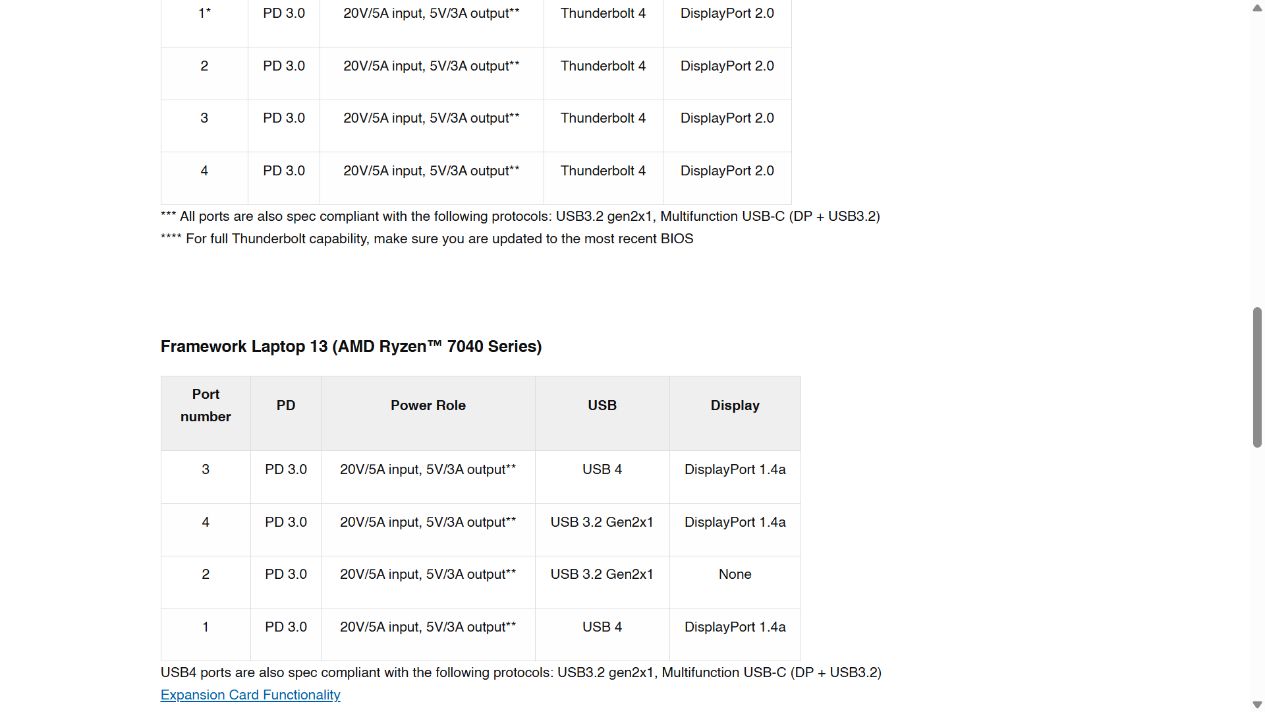
Case image: a browser screenshot of Framework’s matrix, observed on October 28, 2026. This case analyzes the AMD Ryzen 7040 table in the lower half; the preceding generation’s final rows remain visible above it. Source.
Framework also provides a slot diagram and specifies the laptop’s viewing orientation. This addresses an operational question that a table alone cannot resolve: after reading a port restriction, can the customer locate that port? Expansion Card functionality guide
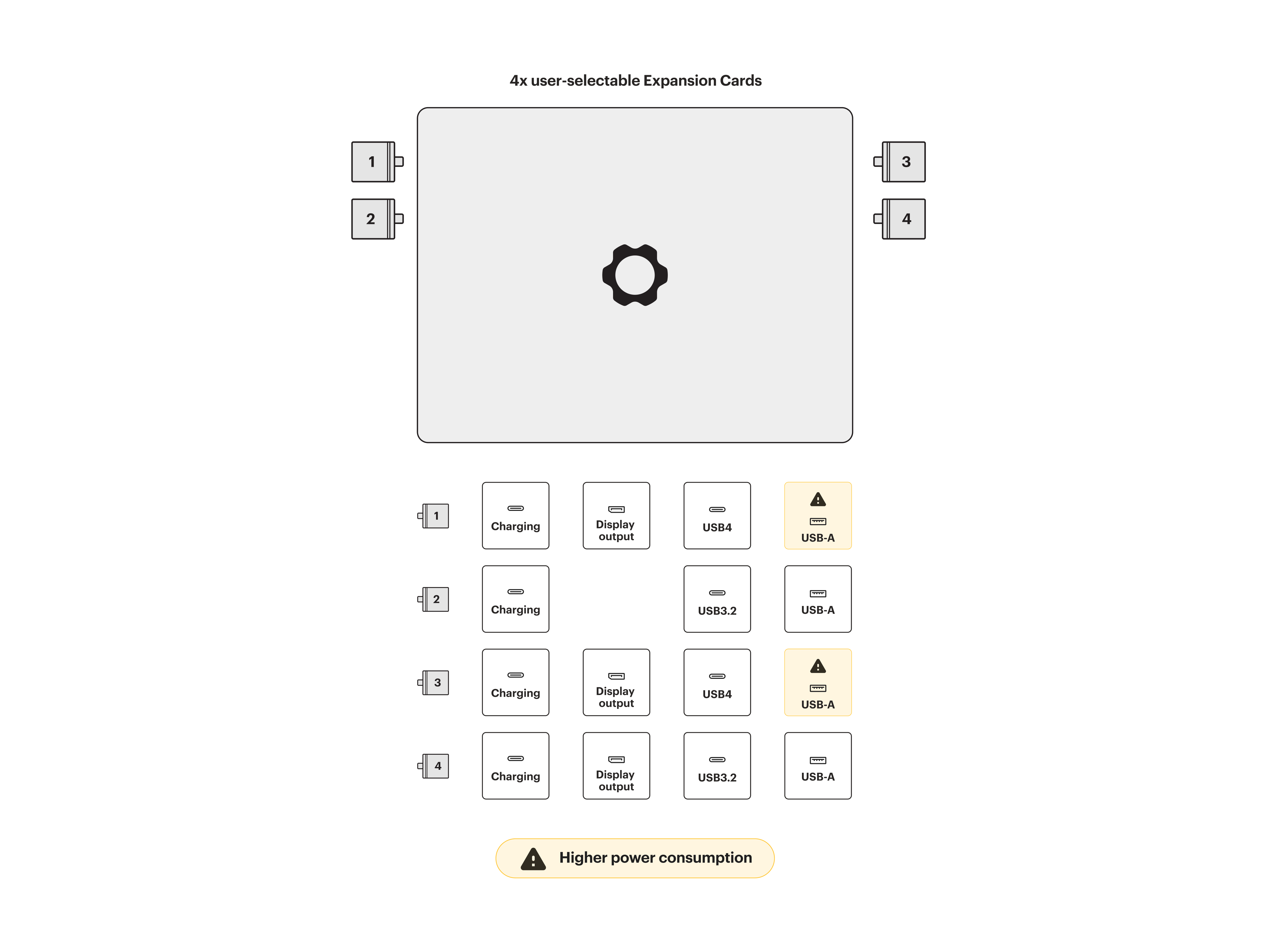
Case image: Framework’s original diagram, retaining port numbers, capabilities, and cautions. It has not been redrawn and applies to the specified AMD Ryzen 7040 Series. Source.
Suppose your store sells display adapters. A customer with this laptop generation plans to use port 2 for an external display. The page should first identify the missing display output at that location, then guide the customer to the documented supported positions and the adapter and monitor requirements. A general “Works with Framework” badge cannot explain that distinction.
The useful lesson is to express compatibility through the exact device version, connection location, and required function. If the customer changes generations, the decision must read the corresponding information again. The previous positive result should not remain on screen.
Put purchase conditions before the detailed specification
Compatibility information hidden in a long FAQ may never be seen before a customer adds the product to their cart. Moving every detail beside the price creates the opposite problem: the product and purchase controls become difficult to find.
Let information unfold with the purchasing decision.
The purchase area should identify the current model, its intended use, and the most important prerequisites. Network equipment may lead with power and installation conditions. A display accessory may lead with the host capabilities it requires. This summary must come from the current product’s data rather than a storewide “widely compatible” statement.
Offer a short questionnaire when the customer needs more help. Ask for inputs that can change the decision: the exact laptop generation, intended port, display requirement, or switch model. Asking about budget, team size, and color preferences first leaves the actual compatibility question unanswered.
Use at least three result states.
- The checked conditions are satisfied. Identify the inputs that were checked and any installation or performance conditions that remain.
- A documented conflict exists. Explain the conflict and a useful next action, such as choosing a supported port or another suitable product.
- Information is insufficient. Identify the missing model, port information, or documented support record, and provide a way to ask for help. Unknown must not default to supported.
Place “Change device” and “Choose again” beside the result. A customer who selected the wrong laptop should be able to correct it without refreshing the entire page.
On a phone, examine how these messages relate to the purchase button. A sticky button can remain available, but it must not obscure the current selection, a conflict, or an unresolved condition. Detailed specification tables can expand; the essential purchase conditions should be directly readable.
Organize Shopify data before connecting the page
Consider a store selling both USB-C display accessories and network equipment. Start with one category, such as display accessories, and complete its workflow before trying to force every technology product into the same rules.
First, decide where each piece of information belongs. Conditions shared by the whole product belong at product level. Information that truly changes with a purchasable model should be maintained with that model. Records about the customer’s existing laptop are a separate reference dataset. The customer’s laptop model is normally a selection input; the need for a dropdown does not make it a variant of the product being sold.
Next, create definitions before entering values. A merchant can open the appropriate resource under Settings → Metafields and metaobjects. Shopify’s current instructions also allow Add definition from the Metafields area on a product page. Check for an appropriate standard definition before creating a specialized one, then choose the content type and relevant input validation. Creating metafield definitions
For a display accessory, an initial information model might include the following. These are proposed fields, not a compatibility system supplied by Shopify.
- Product model and documentation version, identifying the record currently being read.
- Required host capabilities, explaining prerequisites for the accessory.
- Checked device families and generations, going beyond a brand name.
- Conditional support and explicit exclusions, maintained separately.
- Official source links and a review date, allowing staff to trace the decision.
- Suitable alternative products, used when there is a conflict rather than always recommending a more expensive option.
After saving the definitions, open the relevant product, enter its values in the Metafields area, and save. Leave missing information visibly unresolved rather than filling it with “universally compatible.” Adding metafield values
Then read those values into the page. Theme blocks that support dynamic sources can display suitable fields through the theme editor. Start with the condition summary and documentation links. Availability depends on the theme, block, and field type. Displaying metafields in a store
A decision based on a device generation and port location still needs selection logic and interface state. Creating fields does not generate a compatibility calculator. Connecting descriptive text to an accordion does not implement model switching.
If the product has purchasable variants, the selected price, imagery, and cart item must stay aligned. Shopify’s theme documentation requires variant-specific information to update and addresses direct links to a particular variant. A compatibility message should follow the same current selection rather than retaining the previous model’s result. Shopify variant support
Follow a complete selection rather than checking a static result
Continue with the hypothetical display-accessory store. A customer enters Laptop 13, AMD Ryzen 7040 Series, chooses an external-display task, and selects port 2.
The page uses the documentation for that generation to explain the missing display output at the selected location. It shows the relevant slot guide and lets the customer change the connection position. It should not yet declare the entire display setup compatible: the adapter, cable, and intended display mode still need to be checked.
After the customer chooses a position with display output, the page identifies that satisfied condition and keeps the remaining checks visible. If the store lacks the necessary display-mode documentation, it should say what information is needed. Display output alone does not establish support for any resolution and refresh rate.
The customer then changes the accessory they are buying. The page must calculate again. If the new model has no compatibility record, the result should become insufficient information. The item added to the cart must be the accessory model the customer actually selected.
This creates a concrete delivery requirement: device inputs, the decision’s evidence, the explanation, the selected product, and the cart item must remain consistent throughout the interaction.
An office network workflow requires different inputs: power equipment and port, deployment quantity, and intended use. Missing power information calls for further documentation; a performance mismatch calls for an explanation of the network path. Adjust the underlying business decision before designing the questions.
Include changed selections and missing records in acceptance checks
Completing one successful selection proves only that one path works. Before release, the merchant, designer, and developer should work through concrete inputs and record the actual page results.
- Enter through a link to a particular model. The initial model, image, price, condition message, and cart item should all match.
- Change the model midway. Obtain a result, then change the purchasable variant or existing device generation. Verify that the result updates along with the price.
- Enter a documented conflict. Check that the page identifies the specific reason and offers relevant documentation or a next action.
- Enter an unknown device. Leave a model unselected, choose an unrecorded generation, or remove a required value. The page should not default to supported.
- Change selections quickly. The final choice must determine the result. An older response must not overwrite the current state.
- Complete the same process on a phone. Questions, results, correction controls, and the purchase button should remain understandable. Expanded specification images must be legible.
- Have a staff member update a record. Save it, revisit the storefront, and confirm the new value appears. Check that translated content does not retain an obsolete condition.
A conflict shown only in frontend text is not a guaranteed restriction across every purchasing route. If the store must prevent a combination from being purchased, separately verify enforcement coverage, the relevant application or backend capability, and the store’s conditions. That is a distinct implementation task from displaying a message.
Record the reasons for a wrong purchase
After launch, do not evaluate the selection experience solely by whether more visitors add products to their carts. A useful warning may discourage a clearly unsuitable purchase, reducing add-to-cart activity on that path while fulfilling its purpose.
Record the reasons for post-purchase problems separately: the wrong device generation, an unsupported port function, insufficient power, a missing required accessory, or unclear installation. Support conversations should use comparable categories rather than repeatedly recording “doesn’t work.”
Compare those problems with the selection experience. Did the customer miss a message, misunderstand it, or use a common device missing from the records? The first issue may require a better position, the second clearer wording, and the third additional verified data. A visual redesign does not resolve all three.
Only assess a possible relationship with the redesign when sample sizes, observation periods, and traffic sources are sufficiently comparable. The public examples offer ways to explain information and conditions; they do not establish a conversion increase or return reduction.
For WESWOO’s store design and development work, the deliverable can be specific: the merchant confirms product and device conditions, design places the relevant decisions in the purchasing path, development connects fields and selection state to the correct cart item, and staff demonstrate a real data update.
A technology product page should help a customer explain why they chose this model and what conditions still need to be met. With that foundation, photography, specifications, and purchase controls become parts of an understandable decision.