
A crossed-out price should never be inflated simply to make an offer look better. It deserves another look now because it can travel beyond your product page and reach a shopping assistant as evidence that an item is on sale.
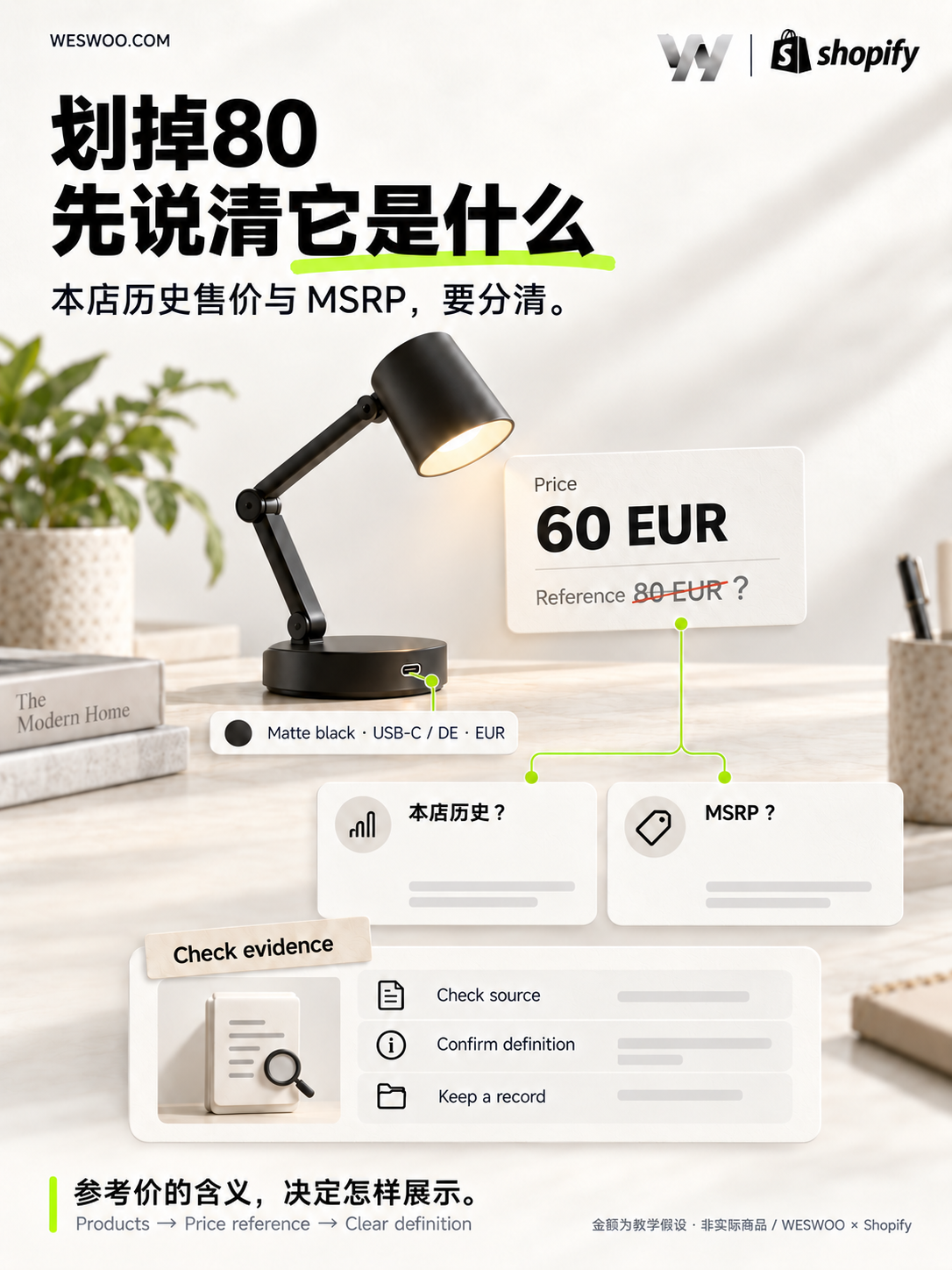
Imagine selling a small desk lamp for EUR 60, with EUR 80 crossed out beside it. A customer reads that as a EUR 20 saving. But what is the EUR 80: your previous selling price, the manufacturer’s suggested retail price, or a number left behind when the page was designed? Those meanings are different.
The immediate job is to make that comparison understandable. For the same lamp, variant and sales region, what prices reach your admin, a shopping assistant, the product page and checkout? What supports the reference price? All amounts below are hypothetical teaching examples using the same Matte black / USB-C variant.
The change: a crossed-out price can become shopping-assistant data
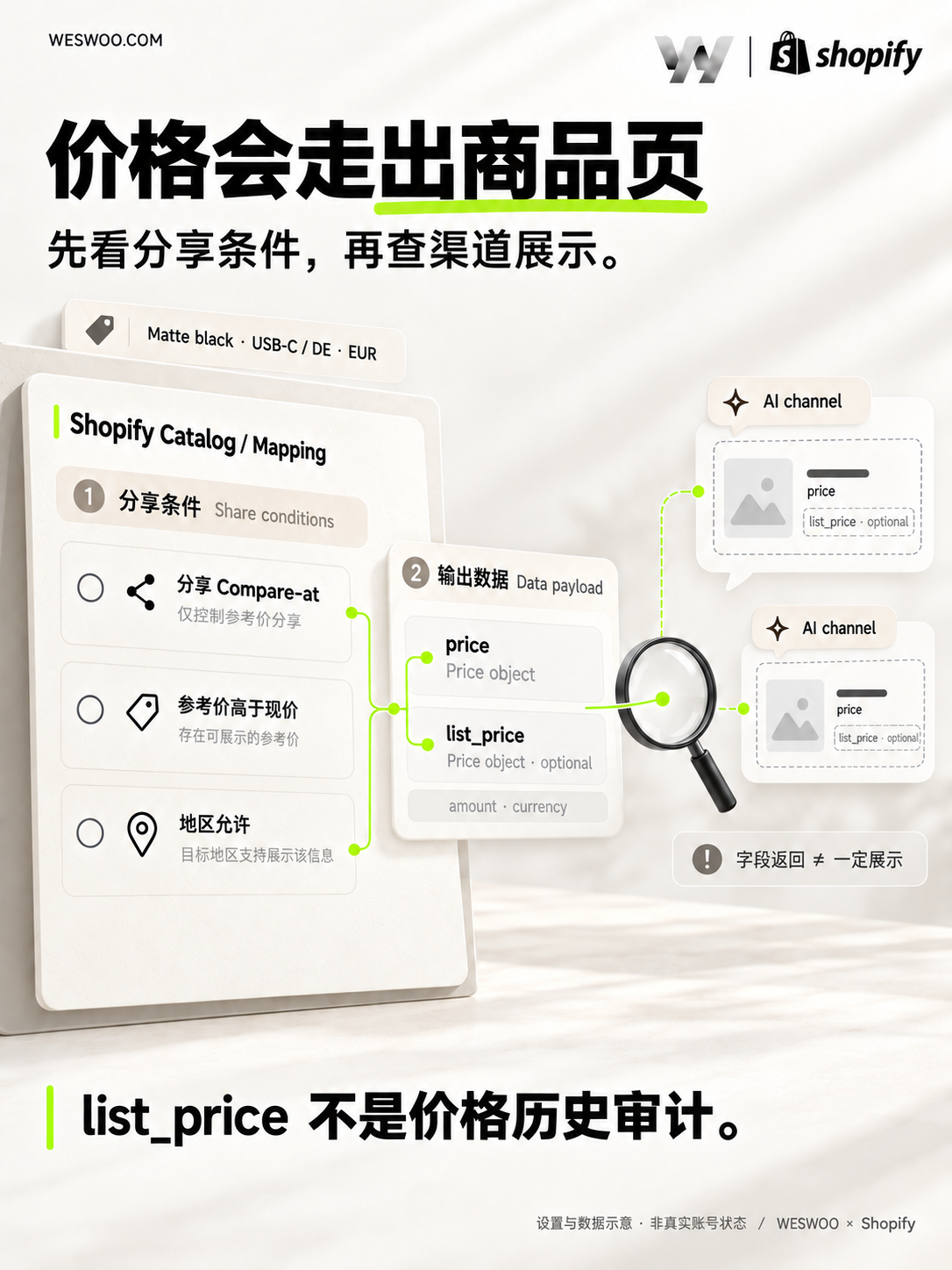
On October 9, 2026, Shopify announced that Catalog API returns eligible variant Compare-at prices as list_price, without changing price. Shopify changelog
A variant is the combination a customer actually buys: a particular color, size or configuration. The white lamp’s reference price cannot explain the matte black lamp’s discount. Global Catalog supports buyer context including country, region and currency, so record the variant and buyer region together when checking prices. Global Catalog documentation
Returning list_price requires Catalog Mapping sharing, a reference price above the buyer’s contextual price, and regional display. Most stores default on; MSRP/reference-price uses default off. Absence means no displayable reference price for that configuration and context, not proof of no historical reductions. Return conditions
Themes control storefront presentation; each AI channel decides whether to display a received reference price. Sale prices and channel display
Establish what EUR 80 means before choosing the display
If EUR 80 is only the manufacturer’s suggested retail price, or MSRP, it expresses the manufacturer’s recommendation. It does not establish that your store previously charged EUR 80. Calling the offer “Was EUR 80, now EUR 60” turns an external benchmark into a story about your own price reduction.
The European Commission’s guidance on unfair commercial practices says recommended retail price comparisons should be explained; unrealistically high references and misleading presentation may mislead consumers. Assessment depends on the circumstances. Adding an “MSRP” label does not automatically make a comparison compliant. European Commission price-comparison guidance, section 2.8.2
Even if you previously charged EUR 80, ask where, for which variant and when. An admin screenshot shows what is entered now. It does not establish the product’s selling history.
A practical coordination problem arises when operations calls EUR 80 the “regular price,” design labels it “was,” and development treats it as a discount baseline for every channel. Everyone reuses the same number, but the claim made to customers changes. Before changing the page, write one clear sentence defining the field’s business meaning. That matters more than choosing the crossed-out style first.
A real product page makes the presentation question easier to see. On October 21, 2026, we viewed Taylor Stitch’s The California Shirt in Breaker Gingham page with M/40 selected. The price area showed USD 94.50 beside a crossed-out USD 135 and a “30% off” message. Near the add-to-cart button, the page also stated that Last Call items were final sale and ineligible for returns or promotional discounts. The useful presentation detail is that price, selected size and purchase restrictions sit in the same decision area, instead of making the customer infer how the offer applies. Taylor Stitch product page
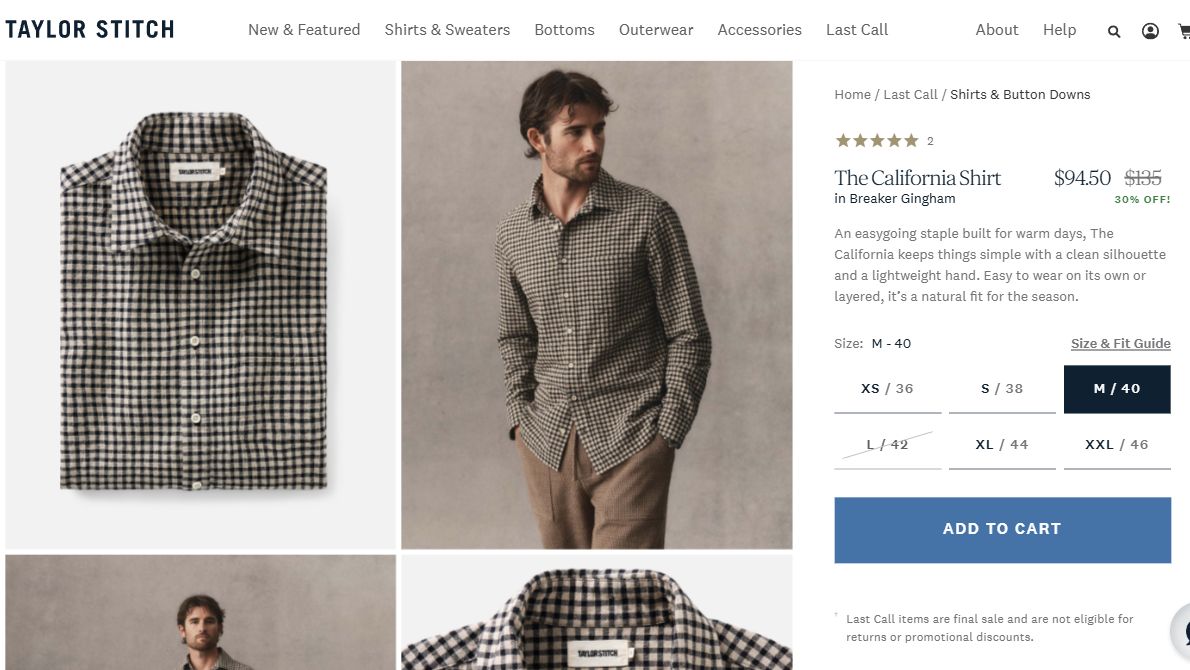
That screenshot establishes only what the page displayed at the time. It does not establish whether USD 135 was this variant’s actual previous selling price, MSRP or lowest price over the preceding 30 days, nor does it establish whether the store’s pricing complies with applicable law. This is neither a WESWOO client project nor a test of an AI shopping channel. A merchant can learn from the clarity of the layout while separately verifying the reference price’s meaning and supporting history; those facts cannot be inferred from a polished product page.
For European sales, the distinction matters directly. For physical goods sold to EU consumers with a price-reduction announcement, Article 6a’s general rule requires the trader’s lowest price during at least the preceding 30 days. Member States have regulatory choices for new arrivals, perishable goods and progressively increased reductions; check the applicable national rules. This is not a universal rule for every price comparison worldwide. European Commission Article 6a guidance
Continue with the lamp in Germany. Assume the general rule applies: its regular price was EUR 80, but it was offered for EUR 70 during the 30 days before the reduction. It now costs EUR 60. Advertising “25% off” against EUR 80 overlooks that prior low. The reduction from EUR 70 to EUR 60 is approximately 14.3%. In its 2024 Aldi Süd ruling, the Court of Justice confirmed that percentage reductions and promotional statements emphasizing a price advantage must use the lowest price during at least the preceding 30 days. Court of Justice case explanation
The list_price field therefore does not automatically become a “lowest price in the past 30 days” field. It carries merchant-supplied pricing data, rather than a conclusion from an audit of price history. The operating team needs records for the relevant region, variant, dates and promotions before choosing the reference price and wording. Developers cannot reconstruct that history from today’s two numbers.
Check the admin data, then the actual display
Start with one variant currently on sale instead of changing the entire catalog. Assemble its SKU, target region, currency, current price, reference-price meaning and applicable historical evidence. Then work through the dependencies.
- Check product data. Open Products → product → Variants → selected variant → Price. Check Price, Compare-at and target-market fixed prices, which override base prices and Compare-at. Shopify sale-price setup
- Check sharing. Open Sales channels → Agentic → Sources → Shopify Catalog → Review product data mapping. Review the Compare-at switch and select the product in Preview. Changing the field’s purpose later does not automatically change the default sharing selection. Preview does not guarantee the AI channel’s final presentation. Catalog Mapping instructions
- Check regional display. For an EEA market you need to review, open Markets → relevant market → More Settings → Compare-at price and inspect Hide compare-at. Do not assume every store uses the same default. Check the actual configuration and result; neither switch position replaces evidence for your price claim. Shopify European price settings
These checks establish the source data, sharing intention and regional configuration. Next establish what customers see. Select the same variant and region, then inspect the product card, product page, Cart and Checkout. If you can obtain a Catalog response or an AI channel’s actual display, compare those too. If the external result is unavailable, record it as unverified. An admin preview is not proof that the change has reached a channel.
Keep successive price changes in one record: which variant, which market, the start and end times, the publicly offered price and promotion conditions, and who checked the reference evidence. Verifiable business records can support price history. A manually maintained sheet should not be described as a historical certificate automatically issued by Shopify.
If the basis for EUR 80 is still unknown, do not let a design settle its meaning. Pause the claimed saving until the evidence is clear. Nor should a missing field be filled by applying a standard multiplier across the store. A consistent percentage does not establish that every item has the selling history it implies.
Consistency does not require identical displays everywhere
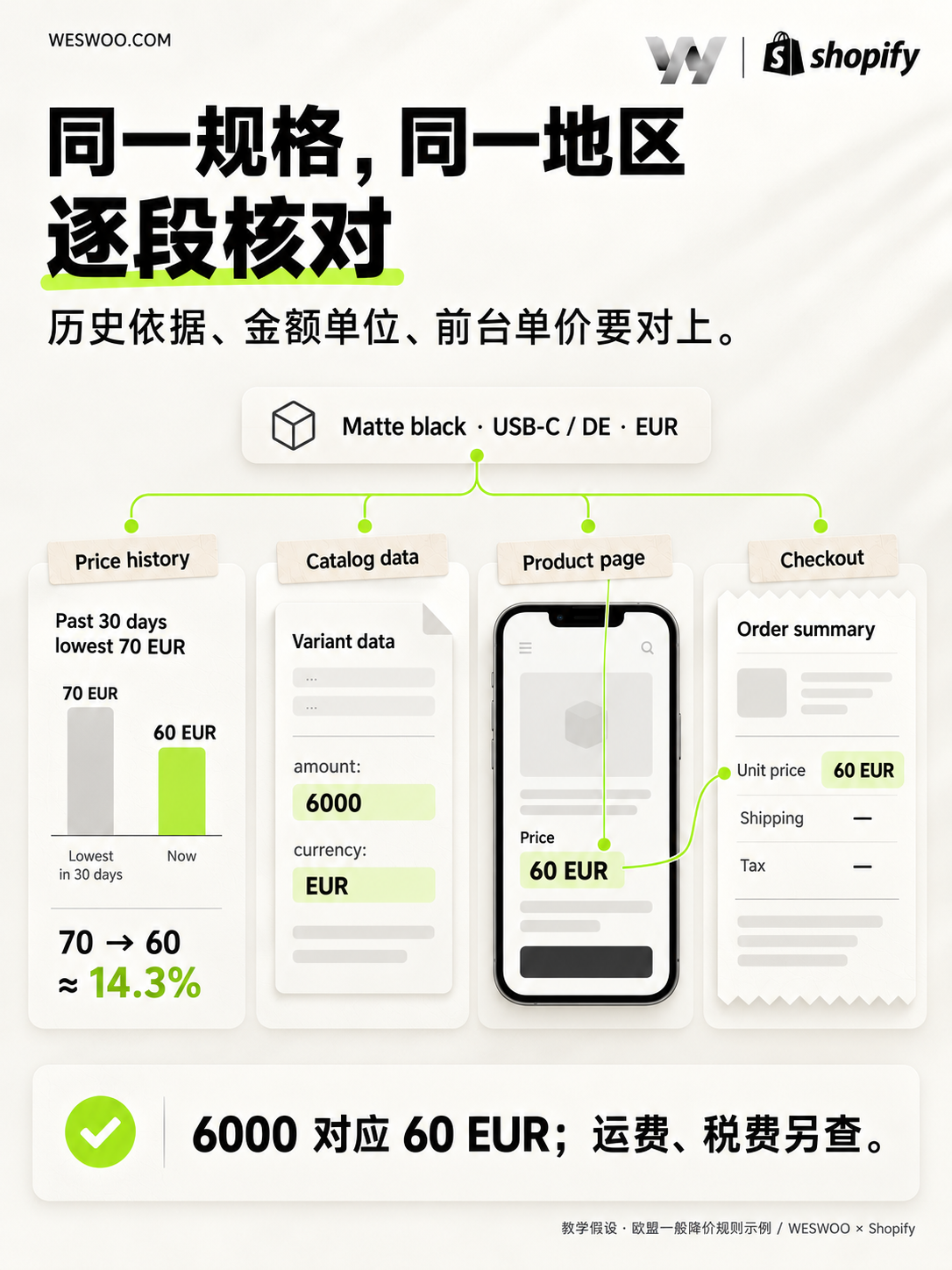
Two details are particularly easy to miss during implementation: the amount’s unit and the variant’s identity.
UCP amounts use currency minor units and an explicit currency code: EUR 60 here is amount: 6000, currency: EUR. Variant IDs identify checkout items. Catalog responses are contextual; checkout is authoritative for the transaction. UCP Catalog specification: Price and relationship to Checkout
Follow this matte black lamp through the actual flow. Select it and check that the page has not retained another color’s reference price. Add it to the cart and inspect the options, quantity and item price. Switch to the target market and check currency and regional pricing again. If the page shows EUR 60 but the cart contains another variant, matching numbers do not make the flow correct.
Checkout need not retain a crossed-out price: Shopify says it shows the sale price, while product and collection pages can show both. Sale-price checkout behavior Follow the same item’s price and conditions. Investigate shipping, tax or additional discounts separately rather than comparing an order total directly with a product-page unit price.
Repeat the flow when the promotion ends. If the admin price has reverted but a banner still promises “Save 25%,” or an old cached value keeps a stale reference price on one variant, the customer still receives contradictory information. Updating one field does not complete the job.
Retain a corresponding set of evidence: data before and after the change, the selected variant and market, key storefront steps and the time checked. When something differs, those records help distinguish a source-data error from an outdated mapping or a page still reading an old value. Otherwise, you can keep changing prices without finding the problem.
WESWOO’s role in this work connects price presentation with data implementation: making reference-price labels express their actual meaning, keeping variant and market changes tied to the correct prices, and checking mapping, product pages, cart and checkout. Merchants supply selling history and price evidence; design and development present it accurately. Wherever a customer encounters this lamp, they should be able to understand which one they are buying, what they will pay, and what the claimed saving is being compared with.