
Connecting Shopify to ChatGPT Ads involves three data paths: a product catalog describing what a merchant sells, browser events describing storefront activity, and server events reporting order facts. They must share product identity and event meaning, or the measurement can count the same purchase twice or describe an unpaid order as revenue.
This article evaluates Shopify’s native ChatGPT Ads app first, then covers custom measurement where needed. API fields and product behavior can change; recheck the linked documentation before implementation. Code is hypothetical illustration only: it contains no real credentials, is not copy-and-run code, and does not claim a deployment. AI assisted the writing; technical boundaries were checked against the linked official sources.
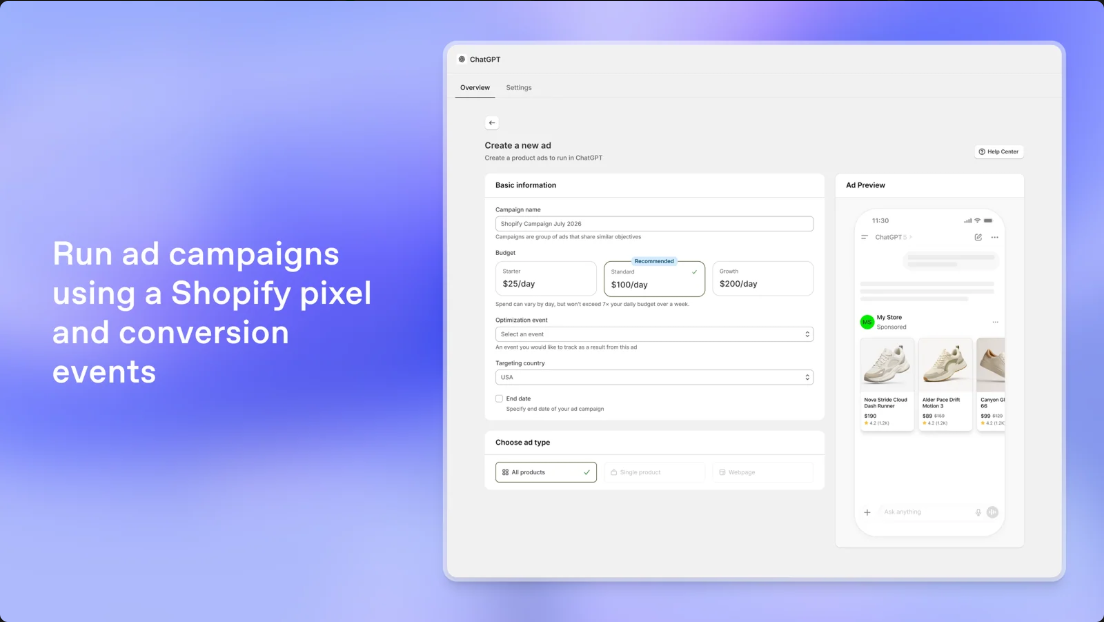
1. Evaluate the native ChatGPT Ads app first
OpenAI’s Shopify App Store listing says its ChatGPT Ads app can connect or create an ad account, sync Shopify products, create campaigns, configure conversion measurement, and report performance in Shopify. It describes using a Shopify pixel and conversion events. For a standard Shopify storefront, first confirm that this native path covers the store’s checkout, markets, and operating requirements before building another pixel or server sender.Shopify App Store: ChatGPT Ads
This is an architecture recommendation, not a claim that every merchant has identical access. Separate three questions: can the store install the app, can its account use the advertised features, and does the integration already send the events you need? Inspect Customer Events, existing theme scripts, tag managers, and network traffic. If the native app owns conversion measurement, do not add a second sender for the same Pixel ID and purchase event. Duplicate integrations complicate attribution, consent, and debugging.
Also distinguish the app’s product workflow from API access. OpenAI documents provisioning a Pixel ID and Conversions API key through Ads Manager. Some Advertiser API operations are documented for approved API partners; do not imply every Shopify merchant can manage campaigns through those partner endpoints.Conversions API; Advertiser API overview
2. Keep product identity consistent across catalog and events
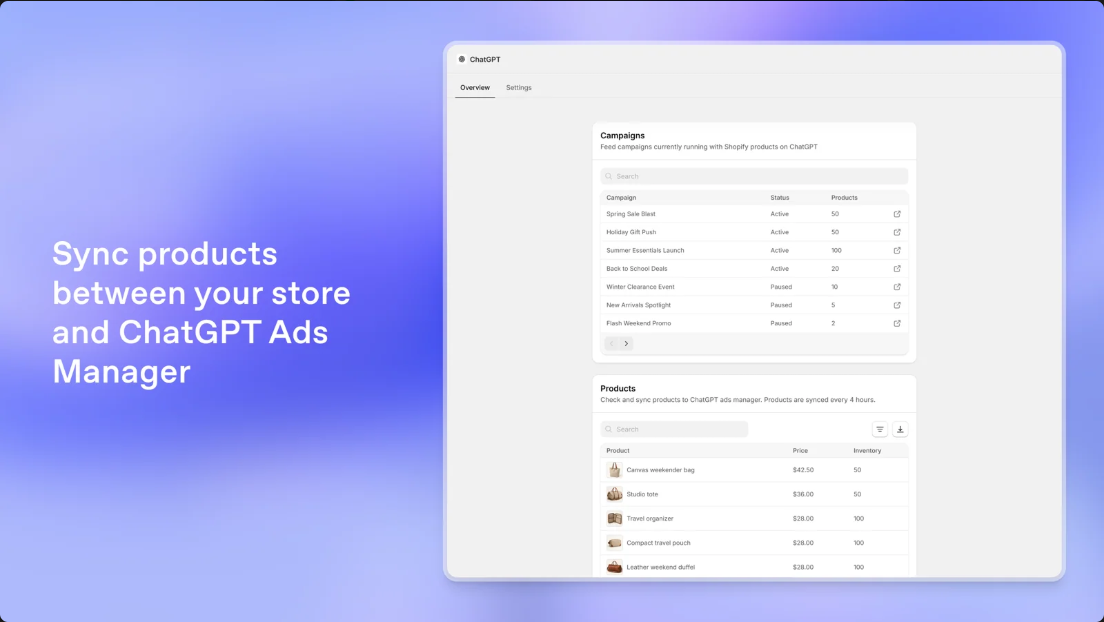
The catalog says which product an ad can show; conversion events say what a customer did. Maintain an explicit mapping across Shopify product and variant IDs, SKU, product-group ID, display name, landing page, market price, currency, and availability. Choose one stable value for event contents[].id. If the catalog uses variant IDs while events use SKUs, do not assume the platform will infer that they are the same item.
Verify exact feed fields in the app’s current configuration. Test changes such as an archived product, a sold-out variant, a regional price, or a new product URL. Imports and migrations can change internal IDs, so a small mapping table may be safer than treating Shopify IDs as permanent business identifiers.
OpenAI’s contents shape can describe item identity, name, quantity, amount, and currency. The current documentation reserves group_id and variant_dict for the Conversions API; do not copy those fields into JavaScript Pixel calls. Its items_added, checkout_started, and order_created events use this shape. Calculate historical conversion value from the order at event time rather than today’s catalog price.Supported Events
Turn that mapping into a field contract rather than leaving it in code comments. For each field, record its source of truth, destination field, transformation, whether it is required, and what happens when it is absent. For example, variant identity may come from the Shopify line item and map through a maintained catalog key; quantity comes from the purchased line; currency comes from the order context; and purchase amount follows the agreed gross-or-net order rule. A missing optional product name can be omitted if the schema allows it, while a missing stable item ID should be treated as a mapping error and routed for review instead of guessed from a display name.
Write down whether the order amount includes discounts, shipping, or tax. The right answer depends on the merchant’s measurement definition and the event schema; consistency matters more than choosing a number that cannot be reconciled later. Keep the original Shopify values alongside normalized values in the restricted processing record so an operator can explain a discrepancy without trusting a lossy display string. Do not use the current catalog price to reconstruct an order: the buyer may have used a discount, bought a different quantity, or checked out under a regional price.
Catalog data is not attribution data. A feed describes available products; oppref and pixel activity support attribution; order fields describe a conversion. Keep views, cart additions, checkout starts, and purchases as distinct stages.
3. Shopify’s Web Pixels sandbox changes collection behavior
Shopify’s Web Pixels API runs in controlled Lax or Strict sandboxes. App Web Pixels use Strict; Custom Pixels use Lax. Pixels subscribe to Shopify Customer Events and use controlled Analytics, browser, and initialization interfaces. They should not assume free access to the storefront DOM, global variables, or checkout page.Shopify Web Pixels API
Standard events give themes and checkout flows common names, but their payloads and timing should be inspected in the actual store. Shopify lists page_viewed, product_viewed, product_added_to_cart, checkout_started, and checkout_completed. The list does not define an OpenAI mapping, and not every Shopify event is an advertising conversion.Shopify Standard Events
Keep pixel handlers small: recognize the event, select necessary fields, check privacy state, then use transport supported by the sandbox. A Strict sandbox cannot run a conventional SDK snippet that depends on window or document. Evaluate supported network requests to a first-party collection endpoint, with Conversions API calls made server-side. A Custom Pixel’s Lax environment also requires SDK compatibility checks. Never place the API key in pixel code or forward entire customer/cart objects. Test product views, carts, checkout, and payment outcomes in the actual storefront.
For a Headless storefront, treat event coverage as an acceptance question for the specific frontend and checkout. List the user-visible actions the business needs to measure, identify which component can observe each action, and prove that the event reaches the intended collection path with the correct product and consent context. A storefront route change is not automatically a product view, and a button click is not proof that an item was added. Where the headless application owns the interface, its event bridge should describe confirmed application state transitions and avoid emitting a second copy if another installed pixel already reports the same action.
The acceptance record should name the storefront build, test market, device/browser context, event source, expected payload fields, and observed result. Exercise navigation to a product, variant selection, add and remove cart actions, checkout entry, and a completed or failed payment path where the test setup permits. Include the route that leaves the storefront for checkout and the return path, if one exists. If the integration cannot observe a step, state that as a coverage gap rather than filling it with an inferred purchase. These checks validate the actual storefront boundary; they do not imply that every headless checkout exposes the same Shopify events.
4. Map events by business meaning, not by similar names
| Shopify event | OpenAI candidate | Mapping rule |
|---|---|---|
product_viewed |
contents_viewed |
Include a specific product; a generic page is not a product view. |
product_added_to_cart |
items_added |
Describe items added in this action, not removals. |
checkout_started |
checkout_started |
Checkout intent, not a completed purchase. |
checkout_completed |
order_created |
Only if “completed” matches the store’s purchase definition. |
page_viewed |
page_viewed |
Use for meaningful page activity, not as a proxy for purchase. |
This mapping is a merchant-owned rule, not automatic interoperability. OpenAI defines order_created as a completed purchase. Shopify’s orders/create webhook, however, only says an order record was created; it does not prove payment. For delayed payment, manual capture, or later failures, mapping every created order to revenue overstates paid transactions. Choose whether the goal is an order, a paid purchase, or another state, and name the authoritative source.
OpenAI’s current standard list includes order_created, but not standard order_paid or refund events. Do not invent a standard name or report a refund as a new purchase. Keep refunds in the merchant’s accounting and analytics. Use a custom event only after confirming its support and reporting meaning. Do not assume order_created is automatically reversed when an order is refunded.
5. Treat created, paid, and refunded as separate facts
orders/create means an order resource exists and may still be unpaid. orders/paid means Shopify reports the order as paid; it may be the server-side source when the conversion definition is confirmed payment. Still check partial payment, test orders, re-payment, currency, and which total is measured. A refund is a later adjustment linked to the original order, not another order.
Because OpenAI defines order_created as purchase completion, a cautious server design emits one purchase event only when the selected paid-order condition is met. That is a merchant architecture choice, not a universal OpenAI instruction to subscribe to orders/paid. If paid does not equal final settlement in the store’s payment model, define and reconcile the rule first. If the goal is intent, use a checkout event or a properly scoped custom event rather than calling order creation collected revenue.
For refunds, retain the original order ID, refund ID, amount, currency, time, and partial/full relationship. Use them to calculate net sales in internal reporting. Send a platform refund event only if its current documentation and the merchant’s account confirm the required semantics. The documented OpenAI standard taxonomy has no refund event, so purchase attribution should not be assumed to self-correct after a refund.
Think of the lifecycle as a small state timeline. At checkout completion, the browser may observe the customer-facing result. At order creation, Shopify has an order resource. At payment, the merchant may have a confirmed paid state according to its configured payment flow. Later, cancellation, partial refund, or full refund can change the financial interpretation. The timestamps can differ, and a delayed payment can arrive after the browser session has ended. Preserve the timestamp for the fact being reported, and do not overwrite the original order-created time with the later payment time without making that event definition explicit.
This timeline also affects backfills. A reconciliation job may discover an order after a webhook outage, but it should apply the same eligibility and idempotency rules as the live path. Before sending, determine whether the event was already accepted or remains pending, whether the event timestamp still fits the documented window, and whether the order remains eligible under the merchant’s rule. The backfill must not create a new ID simply because it runs in a different process.
6. Browser/server deduplication is explicit, and first event wins
OpenAI documents deduplication between the Measurement Pixel and Conversions API. Use the same value as browser event_id and server id, with the same Pixel ID. Matching uses Pixel ID, event name, and event ID. For custom events, use the same custom_event_name as well. OpenAI keeps the first matching event and ignores later duplicates.Conversions API deduplication; Measurement Pixel behavior
Deduplication does not compare event quality. If a browser sends a $100 checkout value first and the server later reports $80 actually paid with the same ID, the first event may remain. The system does not pick the more complete event or add them together. Either let the server alone report purchases while the browser measures the funnel, or ensure both sides describe the same event, amount, currency, and ID. For delayed-payment stores, establish the purchase fact server-side before deciding whether browser/server purchase duplication is appropriate.
The ID must stay stable across retries, webhook deliveries, and backfills. A deterministic value derived from store and order identifiers is a useful design example; a new random ID per retry makes the event appear new. The following JSON is illustrative only:
Define the ID namespace alongside the event definition. A purchase ID should represent the merchant’s chosen purchase fact for one order and one Pixel, not each webhook delivery attempt. If the design also sends separate funnel events, use event-specific ID namespaces to keep reconciliation clear. Event name is part of the deduplication key, so different event names are not merged merely because they share an ID; reusing an ID for another purchase with the same Pixel and event name can incorrectly suppress that purchase. Keep the source order identifier available in the private processing record so support staff can trace an event without embedding customer details in the ID.
The ordering of browser and server sends is an operational choice. If the browser is allowed to report a purchase before the server has verified the selected order state, the server copy cannot later upgrade that record when it arrives with the same deduplication key. If server confirmation is the definition of purchase, make the browser event a funnel event and let the server send the purchase, or wait to emit the browser purchase until the same fact is known. The chosen arrangement should be tested under delayed payment and retry conditions, not only on a fast card checkout.
{
  "validate_only": true,
  "events": [{
    "id": "demo-shop-order-2048",
    "type": "order_created",
    "timestamp_ms": 1791540000000,
    "source_url": "https://example.invalid/checkout/complete",
    "action_source": "web",
    "data": {
      "type": "contents",
      "amount": 1299,
      "currency": "USD",
      "contents": [{ "id": "demo-variant-17", "quantity": 1 }]
    }
  }]
}
All values are hypothetical. example.invalid is not a live shop; there is no real Pixel ID, API key, HMAC, or executable request. validate_only: true validates without saving the event, so passing validation does not prove delivery or attribution.
7. Verify webhooks, deduplicate deliveries, and queue work
Shopify HTTPS webhooks include X-Shopify-Hmac-SHA256. Verify it by computing HMAC-SHA256 over the raw request body with the app secret and safely comparing the result. Verify before parsing and trusting the payload; parsing or reserializing first can change the signed bytes. Use X-Shopify-Webhook-Id to detect a retried delivery. X-Shopify-Event-Id can correlate different subscriptions triggered by the same merchant action.Shopify webhook verification
Keep the receiving endpoint narrow: verify signature, validate shop/topic and basic fields, persist the necessary fact to a durable queue, then respond promptly. A worker can normalize the order, apply processing checks, map fields, calculate the stable conversion ID, and send to OpenAI. Shopify recommends quick acknowledgment and queues for traffic bursts; webhook delivery can retry after failures, and repeated failures can remove a subscription. A queue reduces the impact of a temporary downstream outage, while a reconciliation job can identify missed facts.
Assign ownership clearly. Shopify supplies order facts and webhook delivery. The merchant or integrator owns signature checks, idempotency, event semantics, retries, data minimization, and credentials. OpenAI receives schema-compliant events and applies its attribution rules. An accepted request does not prove the amount is correct, the data had a valid processing basis, or the advertiser will see an attributed conversion.
Use two idempotency layers because they answer different questions. The webhook-delivery key identifies a repeated delivery of the same Shopify notification. The conversion key identifies the one business event that may be sent to the ads endpoint. Record both, plus shop and topic, with a processing state such as received, queued, sending, accepted, retryable failure, or terminal failure. A retried notification should not enqueue duplicate work, and a worker retry should reuse the same conversion ID. These states make it possible to distinguish “Shopify redelivered” from “our request timed out after transmission.”
Persist enough information to resume work after a process restart: the verified event body or the minimum normalized order facts needed to build the request, the original event time, the consent decision needed by the policy, and the current attempt state. Protect that record as sensitive data, restrict access, and apply a retention limit. A dead-letter queue is still storage; it should not become a long-lived place where raw customer details are casually visible.
Retry only after classifying the failure. A temporary network problem or service outage may merit bounded retries with backoff and jitter; a malformed event or invalid credential needs correction before another attempt. Keep retry count and next-attempt time, cap the retry window, and send exhausted work to a review path. If the receiver timed out after the destination may have accepted the request, retry with the same ID so an uncertain outcome does not become a second business conversion. The exact response policy should follow the current API documentation and the integrator’s transport behavior.
8. Handle oppref, source URL, time, amount, and hashes separately
The Pixel SDK captures oppref from a landing URL, stores it in a first-party __oppref cookie, adds source_url, timestamps events, and can hash supported customer information when automatic advanced matching is enabled. The server API does not capture oppref. If available, collect it within the permitted data boundary and pass it unchanged. It is an opaque OpenAI-provided identifier, not something to generate or infer from an order number.Measurement Pixel; Conversions API fields
For a web event, source_url is the source page. timestamp_ms is when the event happened, not when a queue worker sent it. OpenAI requires it to be within the last seven days and no more than ten minutes in the future. Retain the original event time on retry. amount is an integer in the currency’s standard minor unit and requires a three-letter ISO 4217 currency; USD 12.99 is 1299. Do not treat every currency as having two decimal places.
Normalize user values one field at a time before hashing. Email is trimmed and lowercased. Phone formatting is removed while retaining the country code and following the documented leading-character rules. External IDs preserve case. Names are lowercased and stripped of whitespace and ASCII punctuation, while non-ASCII characters remain. Hash the UTF-8 normalized value with SHA-256 and send lowercase hexadecimal output. Geographic fields are raw strings. Hashed identifiers can still match people, so they still need purpose, retention, access, and transmission controls.
Treat the payload as a contract with a source for every value. A useful review table has columns for destination field, source record, normalization, inclusion condition, and validation. For example: event time comes from the recorded business transition; event ID comes from the stable conversion key; amount and currency come from the selected order total and order currency; contents come from mapped line items; source URL comes from the permitted web context; and matching fields come only from approved customer data. This makes it easier to spot fields that were copied from a convenient object rather than selected for a defined purpose.
Validate values before building a batch. Check that timestamps are integers in milliseconds, the timestamp belongs to the event rather than the send attempt, the amount is an integer in the currency’s minor unit, and each currency is a valid three-letter code. Check that item quantities and identifiers align with the mapping contract. For source URLs, avoid adding unrelated customer data or sensitive query parameters; retain only the URL context needed for the documented event. Do not silently coerce bad values to zero or substitute the current time, because that hides upstream defects and changes the meaning of the event.
9. Put consent, CSP, and secrets into the real data path
Shopify’s Customer Privacy API lets pixels read initial permissions and subscribe to consent changes. App Pixels can declare the permissions they require, allowing Shopify’s Pixel Manager to load them only when granted. OpenAI’s Pixel defaults consent to allowed. If prior consent is required, deny it before initialization and allow future events only after consent; blocked events are not replayed later.Shopify Pixel Privacy; OpenAI Pixel consent and CSP
Consent controls must reach both paths. If a customer declines advertising measurement and the browser stops its Pixel, but an order webhook still forwards the full customer record, the two paths enforce different rules. Carry the processing purpose and current permission state into the event service; apply the merchant’s approved data rules to whether it sends an event and which fields it includes. Update later processing when permission is withdrawn.OpenAI conversion-data sharing requirements
Separate essential transaction data from optional matching fields. Limit each field to a known source, appropriate basis, minimum retention, and restricted access. Do not put raw email or phone in ordinary logs or readable dead-letter queues. Normalize and hash on the server. Keep the OpenAI API key and Shopify app secret in server-side secret management, never in theme code, pixel settings, browser requests, or public repositories.
Review existing CSP directives for the Pixel SDK and event transport: script-src, connect-src, and img-src. Add only the domains OpenAI currently specifies. Avoid broad unsafe-inline or wildcard permissions. CSP controls which resources load; it does not implement consent or field minimization.
Keep a decision record for the privacy boundary: which event categories are allowed, which customer fields are optional, how a current permission decision reaches the server worker, and what happens when permission is unknown or changes before queued work is sent. This article does not prescribe a legal basis; the merchant must apply its approved policy to the store and markets. The engineering implementation should make that policy enforceable and auditable. A minimal purchase payload may be appropriate even when optional matching fields are excluded, but whether to send any event under a particular permission state belongs to the merchant’s rules.
10. Validate, monitor failures, and scope WESWOO’s work
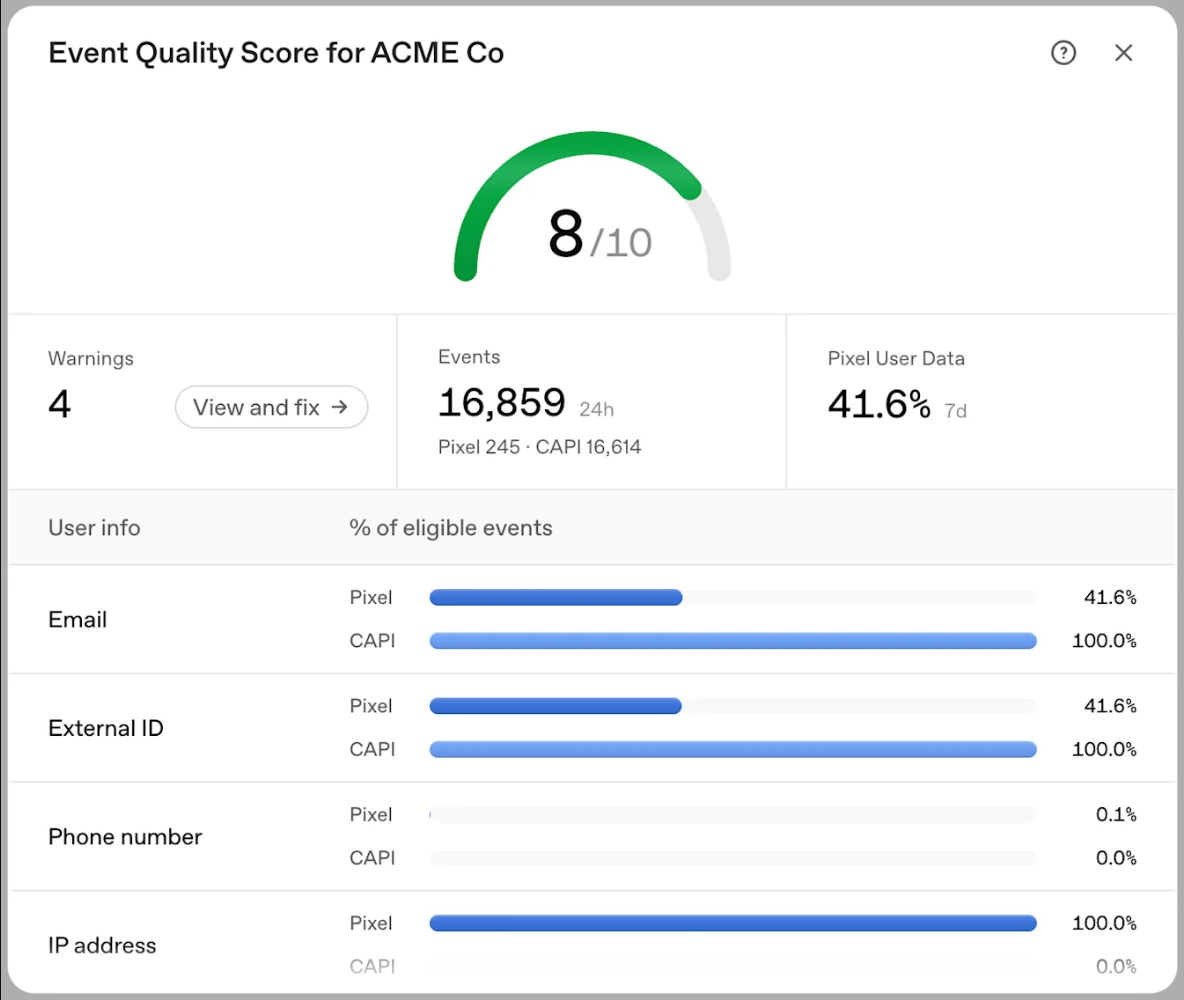
Test in two stages. First, validate_only: true checks payload structure, fields, event names, timestamp range, amount type, and user-data formatting; it does not save events. Second, use an authorized test Pixel and advertiser account to send a controlled event, then confirm in Ads Manager or the documented debug surface its Pixel ID, event, amount, time, and deduplication result. Pixel debug can show browser SDK activity, but not prove server acceptance.
Monitor four distinct failures. A 401 points to credentials, Pixel ID, or authorization configuration. A 422 points to an invalid field, event, timestamp, or amount. OpenAI permits batches up to 1,000 events, but one invalid event fails the whole batch. A lost conversion may mean Shopify has an order but no queue item, or a queue item has no successful request. Track event ID, shop, topic, time, retry count, response class, and redacted error context. Alert on dead letters, queue age, failure rates, and discrepancies against orders, not only HTTP 200. Avoid personal data in metric logs.
Make the monitoring path observable from receipt through reconciliation. Count verified webhook deliveries, rejected signatures, newly queued facts, duplicate delivery keys, conversion events attempted, accepted requests, retries, and terminal failures. Measure queue age and oldest pending item, not just queue size: a small queue can still contain a very old blocked event. Track the time between the Shopify fact and the outbound attempt, and group failures by response class without exposing personal information. A dashboard should let an operator answer whether the event was never received, filtered by policy, waiting in queue, rejected by schema, or accepted but not yet visible in reporting.
Set alerts against the agreed operating thresholds, then document who responds and what evidence they inspect. A rising 422 rate often indicates a mapping or payload regression; a rising 401 rate can signal a credential or account configuration issue. A queue-age alert can reveal a downstream outage even when the webhook endpoint continues to acknowledge incoming work. Reconciliation should compare eligible Shopify orders with conversion records by stable order key and state, and report the unmatched count and age. Because reporting visibility can differ from request acceptance, keep transport acceptance and attributed reporting as separate checks.
For a headless launch, include explicit acceptance evidence: event coverage for each agreed storefront action, correct product identity after variant changes, no duplicate event from overlapping integrations, consent behavior on initial load and after a preference change, checkout handoff behavior, and server-side purchase delivery for the chosen order state. Test delayed payment, failed payment, repeated webhook delivery, a temporary destination failure, and a backfill where feasible. Record known gaps, such as a checkout step outside the storefront’s observable boundary. Passing a payload validator alone is not evidence that this end-to-end path works.
WESWOO can scope work around Shopify-to-catalog identity mapping, Web Pixel event review, server-side order normalization, consent-aware field minimization, CSP, idempotency and retry monitoring, and headless storefront event bridges. Practical outputs include a field map, event definitions, test matrix, incident guide, and reconciliation measures. These are integration capabilities, not a promise of ROI or media results. Scope depends on the store architecture and account access; this article does not claim its example is installed or running, and makes no fee or delivery-time commitment.WESWOO Shopify integration services
Summary: Evaluate the native Shopify ChatGPT Ads app first. Add separate pixel or server paths only where the architecture needs them. Keep product identity stable, map events by meaning, and distinguish order creation, payment, and refund. If the same event is sent twice, reuse the event ID and remember that the first copy wins. Verify webhooks, use idempotency and queues, handle oppref, money, time, and user identifiers by their individual rules, then validate, test an actual authorized event, monitor delivery, and reconcile against Shopify orders.

WESWOO — Shopify Storefront Development
We help Chinese brands expand internationally with storefront development and Shopify Plus integration services, supporting their cross-border commerce operations.
- Shopify storefront branding
- International UI design
- Multichannel social media marketing