
Licensed IP and collectible models
Pigeon Spaceport
Pigeon Spaceport translates licensed IP, manufacturing craft, scale and limited or preorder states into a global transaction experience collectors can trust.
Visit the live project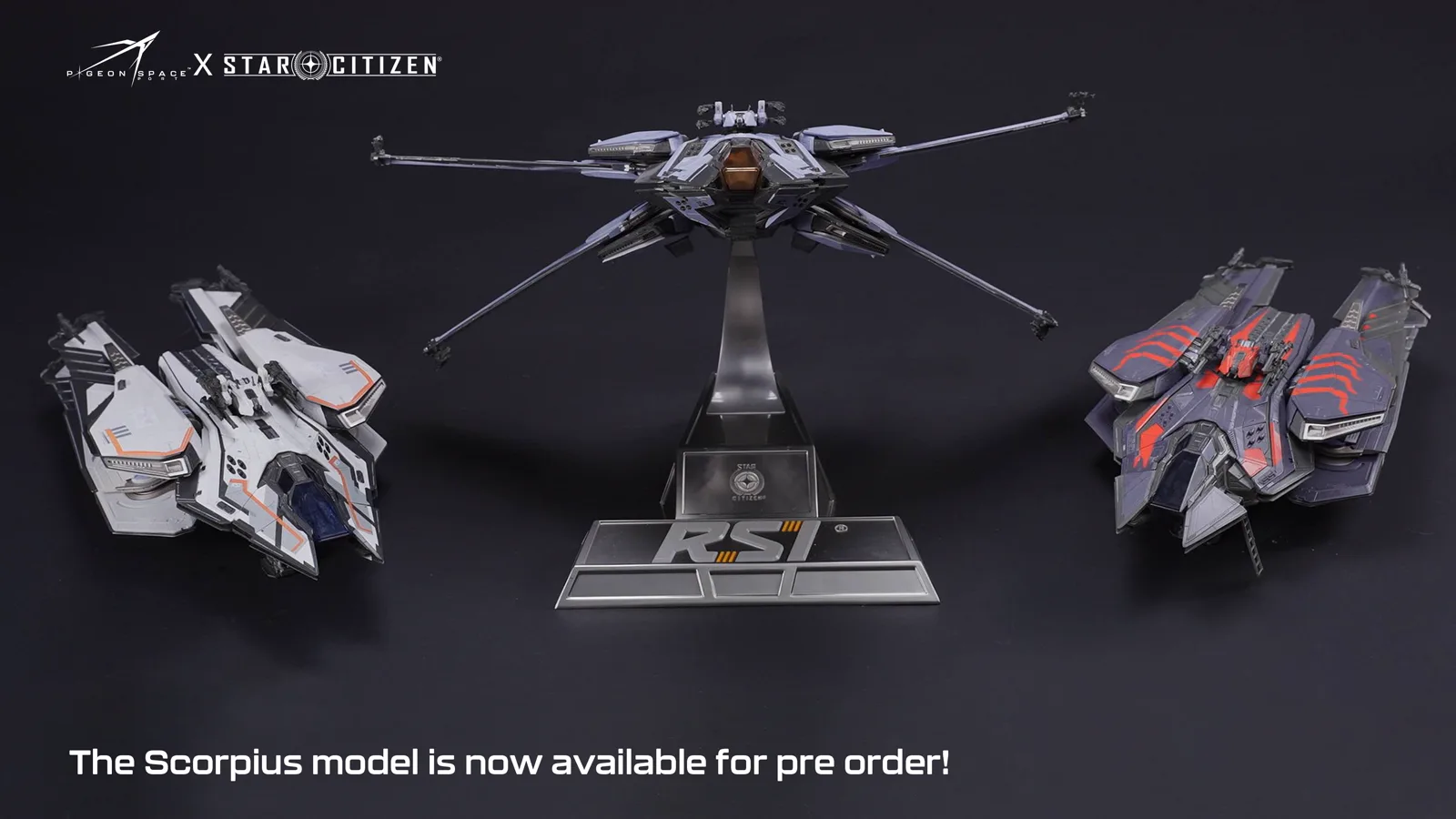
Core implementation review
Three storefront journeys from model choice to purchase
A licensed ship model has to be inspected as a physical object, not admired as atmosphere. The storefront keeps paint close-ups, the shoppable SKU and destination copy on one path, so a collector can tell Avalanche from Standard, add that exact finish, and read packing and delivery rules before paying.
Project context
Define how customers choose before defining the storefront
Collectors browse by IP, ship or manufacturer, then compare scale, paint, assembly and pack quantity. Licensing, detail photography, batch or preorder timing, packaging and global shipping policy support a high-value purchase.
Shopify frontend, licensed-product taxonomy, variants and bundles, preorder and global purchase journeys.
Keep Avalanche and Standard comparable in one crop
Collectors need to recognise two paintways of the same hull in the thumbnail, hero and zoom layers, instead of being led by atmosphere frames.
- 01Open the hull product page
- 02Review stills, scale and paint close-ups
- 03Magnify edges and coating
- 04Read licensing marks against the model
Implementation
- The gallery treats the physical model as the subject: multi-angle stills, scale reference and paint close-ups, rather than substituting IP atmosphere for the object.
- media-gallery.js switches views and magnify.js handles zoom; Avalanche and Standard share crop and focus so thumbnail, hero and zoom remain comparable.
- Licensing and limited-edition marks stay legible without covering the silhouette.
Deployment and acceptance
- On mobile, zoom and dismiss targets stay explicit so a collector can leave magnification without losing the page.
- Swiper is reserved for range or content carousels and kept separate from the inspection gallery.
- Theme-editor updates to the media block remount the gallery instead of assuming a single page-load bootstrap.
- Collectors can compare the two finishes under the same viewing logic before they buy.
- Brand atmosphere remains, but it no longer replaces an inspectable model archive.
View script and Shopify API evidence
media-gallery.jsmagnify.jsproduct-modal.jsSwiperShopify theme editor modeSell the paint-finished SKU, not the lore paragraph
Each Scorpius finish is merchandised as a countable product. Display, availability and add-to-cart have to point at that same object.
- 01Confirm the finish on the page
- 02Check price, stock and purchase state
- 03Submit that object through the product form
- 04See the matching line in the drawer
Implementation
- Shoppable structure sits on Shopify products and variants: paint is what gets purchased, while licensing, scale, materials and packaging stay in the content layer.
- product-info.js keeps on-page state aligned and product-form.js submits the same item; quantity controls expose available, unavailable and submitting states so a high-value add is not fired by accident.
- Adds go through Ajax Cart; cart-drawer.js and cart.js treat the returned cart as source, so the drawer names the finish that was actually added.
Deployment and acceptance
- The native product form remains the fallback when scripts or requests fail.
- Theme-editor reloads of product info or the buy block rebind only the affected module, avoiding duplicate submit handlers.
- Lead time, packaging and limited or preorder notes sit in editable content beside the buy area rather than in theme scripts.
- The finish on the page is the finish that enters the cart.
- New paintways can launch by updating product data and media, without a new product template.
View script and Shopify API evidence
product-form.jsproduct-info.jsquantity-popover.jscart-drawer.jscart.jsCart Ajax: addCart Ajax: changeCart Ajax: updateFind the hull by name, then read destination rules before paying
Collectors rarely walk the homepage in order. Search, related finishes and shipping copy need to attach to the same sellable model.
- 01Enter the right range by ship or IP
- 02Confirm the finish and add it
- 03Review related pieces and the cart
- 04Choose a destination and read delivery notes
Implementation
- predictive-search.js uses the Predictive Search API to return product and collection suggestions while typing, so a hull name reaches the correct range.
- The product page calls the Product Recommendations API from the current product context, attaching other finishes or related models to that choice.
- localization-form.js provides country and language entry; duty, lead time and packaging remain merchandiser-owned copy beside purchase.
Deployment and acceptance
- Listing quick-add.js writes to the same Ajax Cart as the product page, so the two surfaces do not keep separate baskets.
- Recommendations load asynchronously and never block gallery, price or the product form.
- Licensed ship names stay globally consistent; sellable finishes and delivery notes change by destination without duplicating add-to-cart.
- From search to the drawer, the collector is still looking at one paint-finished object.
- Destination rules can be updated in content without rebuilding the purchase path.
View script and Shopify API evidence
predictive-search.jsPredictive Search APIProduct Recommendations APIquick-add.jslocalization-form.jsfloating-selector.jscart-drawer.jsCart Ajax: addOperational handoff
The operating team can continue after launch
- Home and collection routes organise the range by licensed IP and hull, so collectors browse Star Citizen ships rather than a generic hobby mix.
- Paint-finished SKUs such as Scorpius Avalanche and Standard are merchandised as sellable products; licensing, scale, materials and packaging stay in the content layer.
- Merchandisers can change which finishes are sellable without rewriting the product template.
- The storefront is English with USD as the default, checkout preloads en-US, and licensed ship names stay globally consistent.
- Country and language selection is handled by the localization controls; duty, lead time, packaging and returns copy remain editable near purchase.
- Paint availability and delivery notes can change by destination without duplicating add-to-cart and the cart drawer.
Research notesPublic sources and verification boundary
Public research sources
Content verification
Industry, product and observable feature notes are verified against the brand site. Apps, admin configuration and commercial data that cannot be confirmed from the storefront are not inferred. WESWOO scope is stated only from project records and client authorization.
Public information last reviewed: 2026-08-12