
When a shopper describes a need in a ChatGPT conversation, an ad has to lead somewhere that can answer the next practical question: is this product right for me, is it available where I live, and can I buy the option I saw? For a Shopify direct-to-consumer (DTC) brand, connecting ChatGPT Ads is therefore a commerce implementation task as much as a campaign setup task. Product data, market rules, creative intent, the landing page, and event measurement must tell a consistent story.
This guide uses “North Ridge Outfitters,” a fictional outdoor DTC brand selling hiking packs, lightweight tents, and insulated bottles. It assumes the brand runs on Shopify and serves customers in the United States, the United Kingdom, and Australia. The brand and scenario are illustrative; they do not describe a real client, project, or measured outcome. AI assisted with organizing the structure and drafting; factual statements were checked against the official sources linked in the text.
The implementation lens matters because a catalog connection can be technically healthy while a customer journey is still inconsistent. A product can appear in a feed but point to a page with the wrong market, a page can show a color that is out of stock, and a pixel can report a purchase event without settling the question of attribution. The work below treats each of those as a separate layer with its own owner and evidence. The sample brand is used to make those layers concrete, not to imply a particular platform result.
1. Confirm eligibility and define what the integration owns
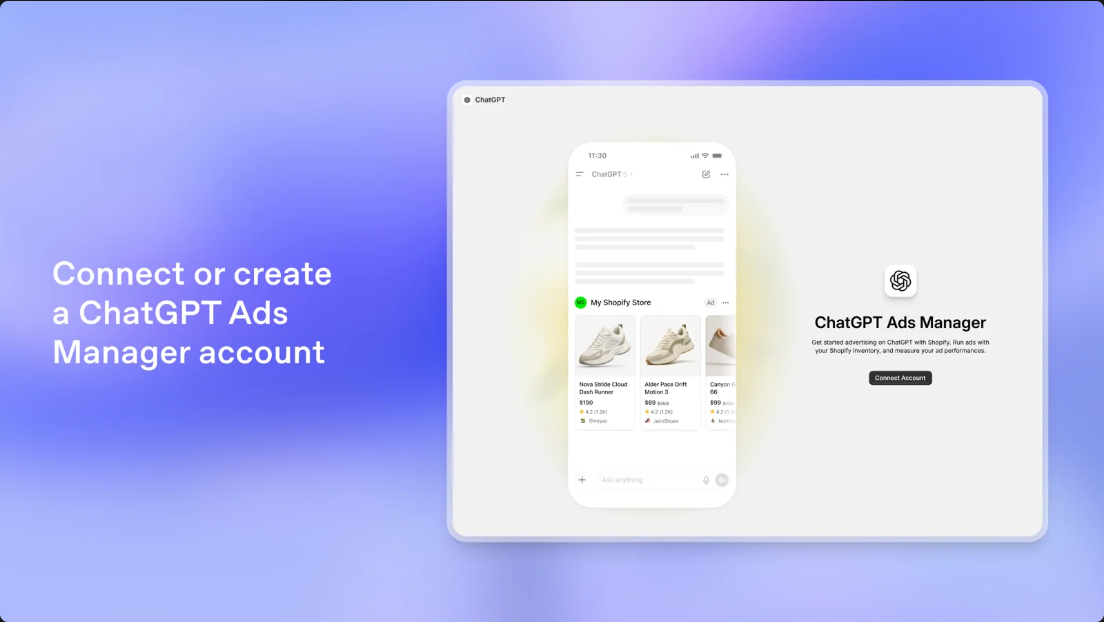
Before installing an app, confirm that the store and advertising account can use the integration in the intended market. OpenAI’s Shopify setup guide lists an active Shopify store, an Ads Manager account or the information needed to create one, and permission to manage both the Shopify app and Ads Manager. Account setup also requires the website, industry, country, currency, and time zone. The guide currently says the integration is available to US Shopify customers and will be available wherever ChatGPT Ads are available. OpenAI’s September 16 announcement said the app would be available internationally in markets where ChatGPT Ads are available starting September 23. The current guide still says US and “shortly” for other regions; neither the announcement nor its planned date guarantees eligibility for a given store or account. Check the live help page, installation flow, and account before launch.
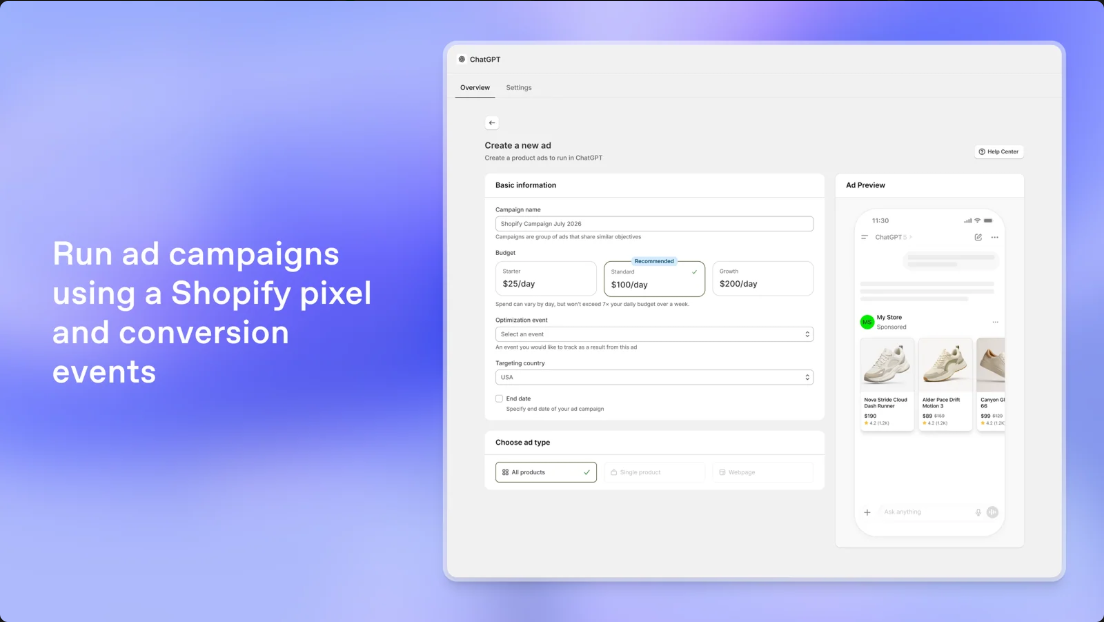
OpenAI’s ChatGPT Ads Shopify app is described as connecting or creating an ad account, syncing a Shopify product catalog, creating campaigns, using a Shopify pixel and conversion events, and managing campaigns from Shopify. For most merchants, the first technical decision should be whether this official app meets the need. A new custom advertising API integration should not be treated as a prerequisite. Custom development may still be valuable for data cleanup, a market-aware storefront, a theme or Headless experience, and internal Analytics, but those are separate responsibilities from reproducing the official connector.
The official app syncs catalog and eligible commerce-event data exposed through Shopify. Shopify may be the operational storefront record without being the upstream master for every field: an ERP may own price or order data, a PIM product content, and a WMS stock. Map ownership by field and verify how each source reaches Shopify and the ad feed. Distinguish paid ads from organic discovery: Shopify’s AI Catalog guide describes product discovery, not paid account eligibility, ad approval, or campaign creation.
Before implementation, write down the boundary between these systems. For example, if a product title originates in a PIM, a price in an ERP, and inventory in a WMS, Shopify may receive those values through existing integrations and then expose the customer-facing record to the official app. The ad connection does not replace upstream ownership. A useful question for every important field is: who changes it, which system is authoritative, how does it reach Shopify, and what visible evidence confirms the final value? For smaller merchants where Shopify is the only operational system, that answer can simply be “Shopify”; the point is to establish the actual setup rather than assume one.
Eligibility is also an account-level operating question. A merchant can have a localized storefront in several countries while the connected advertising account is currently eligible in fewer markets. Record the account country, currency, and time zone selected during setup, identify the team member who can manage Ads Manager, and confirm which storefront and domain are associated with that account. If an account is not eligible, avoid building a launch plan around a hoped-for date. Keep the product and landing-page work useful to the broader store, then revisit the account when the official setup flow confirms access.
2. Connect through the official Shopify app
Install or open the ChatGPT Ads app in Shopify and connect the right Ads Manager account. Before creating a pixel, check Shopify Customer Events for an already registered OpenAI Pixel; connect the existing pixel if appropriate and confirm its status. Eligible commerce events can flow to Ads Manager, while inventory and catalog sync to the product feed. If required events are not covered, or a headless storefront uses an independent event path, specify a custom extension only after checking consent and deduplication; do not send the same event through overlapping pixels. Because sync time varies, an installed app and a usable feed are separate checkpoints.
Assign owners for account access, product data, creative, and consent settings; review the app’s permission screen and privacy controls. If the store is ineligible, prepare the catalog and pages while waiting.
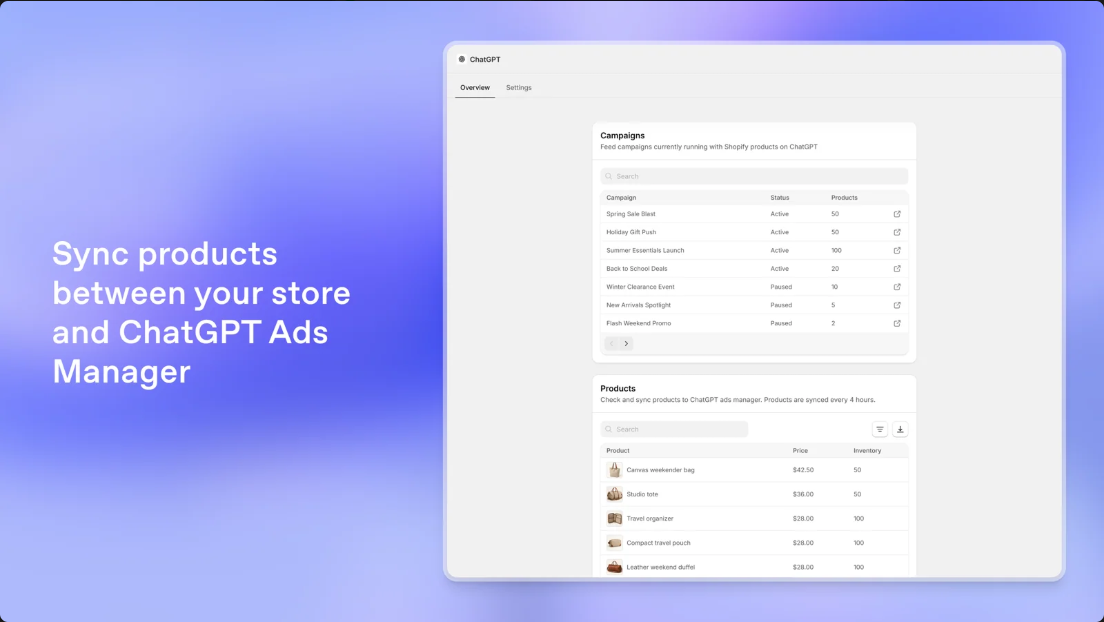
Once connected, separate setup completion into observable states: the app is installed; the intended account is connected; the existing or newly registered OpenAI pixel is visible and connected in Customer Events; product sync has completed; and the intended products can be selected in Ads Manager. These states help diagnose a partial setup without assuming the whole integration has failed. If products are missing, begin with the documented checks: correct account, completed sync, active and available Shopify products, connected pixel, then refresh Ads Manager. A delay in one step should be recorded as a sync or eligibility issue rather than “fixed” by uploading a duplicate catalog through an unrelated path.
For a store that already uses other marketing pixels, compare their ownership and event responsibilities before connecting another one. The aim is not to remove existing tools automatically. It is to avoid two active paths emitting the same purchase or cart event to the same destination without an intentional deduplication design. A consent manager may also change which events are available, so validate the real permitted state rather than testing only with every browser setting unrestricted.
3. Treat the product feed as operating data
Feed quality begins in Shopify. A product title should identify what an item is, and its description should state useful, supportable facts. Images should depict the actual product. Options should represent real variants, such as pack capacity or bottle color. Product status, channel availability, price, inventory, and market behavior should agree with one another. OpenAI says the app syncs catalog and inventory information and receives store updates, which reduces repeated manual maintenance. Sync does not decide whether a product description is clear, whether a selected variant is purchasable, or whether a product promise is accurate.
Review the catalog at three levels. At the product level, check title, description, main image, collection, status, and destination URL. At the variant level, check SKU, option values, price, stock, image mapping, and the out-of-stock behavior. At the market level, check publication, local price and currency, language, domain, tax presentation, and shipping expectations. A hiking pack may be sellable in the United States but unavailable in a UK market catalog. Seeing it in one feed should not be taken as evidence that its UK page works.
Shopify’s agentic storefront Catalog can include titles, descriptions, options, images, prices, and availability, with mapping available for custom data structures. That guidance concerns organic discovery; do not assume custom mappings flow into the paid feed. Verify the Shopify record, app sync, and selectable Ads Manager product separately. Catalog discovery, feed sync, and ad review are distinct states.
North Ridge can assign ownership by SKU for product copy, options, prices, stock, images, and sync issues. Where product data uses metafields or custom structures, map each relevant field from its actual source and verify the result in Shopify and the ad feed rather than assuming Shopify is the upstream master.
The following field audit is a practical working format for the fictional 38-liter pack. “Evidence” means an artifact a team can inspect, such as a product record, market view, app status, or actual destination page; it does not mean that one interface proves every downstream behavior.
| Scope | Fields and consistency check | Field owner | Evidence to inspect |
|---|---|---|---|
| Product | Product title, description, main image, product status, collection, and destination handle describe the same 38 L hiking pack | Product content owner; upstream PIM owner where applicable | Approved product record, Shopify product page, image asset reference, and selectable product in Ads Manager |
| Variant | Evergreen and graphite options have distinct SKUs, correct option labels, matching images, prices, and availability behavior | Merchandising for options; ERP for price where applicable; WMS/inventory owner for stock | Shopify variant records, location inventory view, actual variant selection on the live page, and feed/ad preview |
| Market | The pack is published for the US, UK, or Australia market with the intended language, currency, domain, price, shipping and return information | International ecommerce or market owner | Shopify market/catalog view and the destination URL opened in the relevant market context |
This table should be tailored to the real integration. If the ERP owns price, do not ask a campaign operator to repair a downstream Shopify value without first checking the ERP mapping. If Shopify is authoritative for a particular store, document that and assign a Shopify owner. A field owner is the person or function responsible for the value being correct; the evidence column identifies where the team confirms what the shopper and ad workflow actually receive.
4. Keep inventory, variants, and markets consistent
Variants are a common source of broken expectations. An ad might show a blue pack, while its destination opens with a sold-out black option selected, or strips the selection entirely. For each product page, verify that the default variant, images, price, option selector, availability, shipping details, and out-of-stock message all work together. For products where color or size affects the buying choice, the page can preserve a compatible selection in its URL or clearly guide the shopper to the correct option. Avoid maintaining a separate ad-only representation that drifts away from inventory.
Inventory sync does not replace inventory policy. Shopify tracks stock by variant and location, with states such as available, committed, and on hand. Stock at a location that does not fulfill new orders should not automatically be described as purchasable. See Shopify’s inventory guidance. Assign owners to sync delays, paused products, market exclusions, and sold-out variants.
Market review should test the page the customer will actually see. Shopify Markets supports market-specific currency, product availability, pricing, theme content, domains, and languages. Shopify’s market catalogs control which products are available and at what price. Check that the campaign’s country and destination domain agree; the product is published in that market; price, currency, promotion, and tax presentation are appropriate; language is complete; shipping and returns apply; and the inventory supports the promise. Do not use an IP-based redirect as a substitute for testing the final URL.
Consider one deliberately simple consistency scenario. North Ridge uses an illustrative parent product called “Trail 38 L Hiking Pack” with SKU family NR-TP38; it has Evergreen and Graphite variants. The product team maintains the capacity and use description, the PIM supplies approved copy and images, the ERP supplies the current selling price, and a warehouse system supplies inventory. Shopify receives those fields, associates separate variant SKUs, and publishes the pack only in markets where it can be sold. The US destination should resolve to the US storefront context, while UK and Australian destinations should present their configured local experiences. No currency amount or stock quantity needs to be invented to test consistency: the check is whether the product, selected variant, market, and customer-visible purchase state agree.
Now test a change. Suppose Graphite becomes unavailable in one fulfillment location while Evergreen remains purchasable. The team should determine the resulting available status under its Shopify inventory and fulfillment setup, wait for the official feed update, and inspect both the ad-selectable product and the destination page. If the creative advertises a specific color, the landing experience should not silently select an unavailable alternative. If the ad is product-level and lets the customer choose, the page should clearly show the unavailable option and valid alternatives. This example is about keeping source data and user experience aligned; it does not assume an exact sync interval or a particular platform approval outcome.
5. Translate conversational intent into a Figma landing page
Start with the customer’s task: for example, comparing packs for a two-day hike or looking for an easy-to-clean bottle. These are planning assumptions, not claims about targeting or actual queries. OpenAI’s ad guidance recommends specific, benefit-focused copy and a relevant product or collection destination. Each creative angle should be supported by the landing page.
In Figma, map “ad promise,” “page evidence,” and “next action” before arranging sections. A pack page might lead with capacity and intended trip length, then show a packing example, construction details, adjustment instructions, a capacity comparison, care information, and answers to common questions. It should finish with an understandable variant selector, delivery details, and an add-to-cart action. Every product statement must come from approved brand information. A mockup should not introduce a waterproof rating, load limit, warranty, or certification that the real product does not have. The ad image, title, hero area, and variant photography should use the same approved product references.
Figma also clarifies implementation: mark theme-managed blocks, product data, market-specific content, and campaign-only modules. Show realistic currency and mobile states, including sold-out variants or unavailable products.
A useful design handoff makes the connection between promise and proof explicit. For each concept, name the audience need in plain language, the product fact that supports the claim, the page section that presents that fact, and the action the shopper can take. “Pack for a two-day hike” might map to the approved 38 L capacity description, a packing example and measurements on the page, then a variant selector and add-to-cart action. If the brand cannot substantiate the promise with a product fact, remove or revise the copy before it becomes a design requirement.
In the Figma file, label components according to how they will be maintained. A title and price may come from Shopify product and variant data; a care guide may be a theme-managed rich text section; a country-specific shipping note may be market content; a comparison table may rely on structured product attributes; and a campaign headline may be a controlled page field. Include content limits or examples for long translations, price formats, measurement units, and image crops. Annotate links with the intended locale and market behavior so that developers know whether a design calls for a country-specific domain, a subfolder, or the store’s standard localization flow.
The developer handoff should include the source field, component name, behavior, and fallback for each variable element. For example, specify what appears when a variant image is missing, whether a hidden product should return a not-found state, how a sold-out variant is presented, and whether a market-specific label is omitted or replaced when no translation exists. This makes the design implementable in a Shopify theme or a headless front end and gives ecommerce operators a clear way to update the page after launch. It also limits the chance that a designer’s placeholder becomes a permanent product claim.
OpenAI recommends adding UTM parameters to destination URLs and says landing pages must be valid and reachable without blocking OAI-AdsBot or OAI-SearchBot. It also notes that on ChatGPT’s iOS in-app browser, sharing and copying the full link is the way to inspect tracking parameters; the hostname shown in the interface does not reveal the full URL. Put the URL pattern in the design handoff, but let the analytics owner define parameter values. Then have design, Shopify development, and ecommerce operations test the actual product URL, market behavior, and purchase path together.
6. Draw the boundary between Shopify themes and headless storefronts
For a standard Shopify Online Store, first assess the current theme. If product and collection templates, maintainable content sections, market languages, and variant selection can express the experience, the theme may be enough. Use product objects and appropriate custom fields as the source for truthful page content. Check that variant selection updates the price and image, that market switching produces the right URL and content, and that checkout remains available. Connecting an ad channel alone does not require rebuilding the theme or writing a new official ad API.
In a headless store, the custom frontend team owns more of rendering, routing, market context, cart behavior, and pixel behavior. Landing URLs must be public, stable, and correct for the intended market. Rendering mode, client-side navigation, consent, domain changes, and route transitions should be included in testing. OpenAI’s app documentation explains the Shopify connection and catalog sync; it does not establish that every custom headless route or analytics stack works automatically. Test the production-like frontend and market URLs with the actual app and account rather than inferring event behavior from a successful Shopify connection.
This distinction affects who can safely make a change. In a theme-based store, an ecommerce manager may be able to reorder or update a section without a code release, while a developer still owns the underlying template behavior. In a headless store, changing a campaign URL or product route may require a frontend release and a routing check. In either setup, ownership should be explicit for the canonical product URL, market selector behavior, variant state, consent behavior, and the pixel path. A shared checklist can name the person who approves content, the person who verifies the live page, and the person who confirms event behavior. The goal is not to add process for its own sake; it is to keep a fast campaign edit from changing an unrelated checkout or market route.
7. Prefer the native pixel and keep custom event work separate
When connecting the official app, first assess its OpenAI Pixel for Shopify and commerce-event connection. OpenAI says eligible Shopify events flow to Ads Manager for measurement and optimization. Shopify’s pixels and customer events guide recommends an app pixel integrated with a third-party service when it meets the need, citing a stronger security model and automatic updates. For a typical theme-based store, the native route can reduce custom script maintenance and the risk of theme changes breaking a manually added snippet.
Check the pixel in Shopify Customer Events, app authorization, and privacy controls. Test permitted events for duplication and correct product/value context. Event delivery does not prove attribution accuracy or incremental impact, and does not replace order reconciliation.
Separate the pixel checks into registration, permission, and behavior. Registration confirms the OpenAI app pixel is present in Shopify Customer Events and has the expected connection state. Permission review confirms the store’s consent settings and the app’s authorization are consistent with the merchant’s policies. Behavior review checks that a permitted product view, cart action, or purchase produces the expected event once and with the right product context. The precise events available depend on the Shopify integration and store configuration, so use the official setup and the live app interface as the authority rather than hard-coding assumptions into an article or custom script.
If a gap remains, write down the exact event and why the native pixel does not cover it before proposing custom tracking. For a headless storefront, the gap may be a route transition that fails to expose a normal page load; for another merchant, the issue could be a separately managed checkout or a consent state. A developer should first determine whether the integration already listens to the relevant Shopify customer event. Only then should the team design an extension, including how duplicate events are prevented and how consent is respected. Detailed event schemas, attribution logic, and Pixel/CAPI code belong in a separate engineering specification, which is outside this implementation guide’s scope.
8. Validate the complete customer path before launch
Trace source data to page to event. Check product and variant status, channel publication, market price, and inventory; confirm the account, pixel, feed, selected products, ad preview, destination, and UTM tags. Test the page on mobile and desktop in its target market, then verify expected events under the applicable consent state. A preview is not approval, and a test event is not a validated attribution model.
Test a normal, multi-option, low-stock, and market-excluded product plus a localized or redirected URL. Check response and robots rules; OpenAI says pages must not block OAI-AdsBot or OAI-SearchBot. On iOS, copy the full URL using Share to inspect UTMs. Classify failures and retest after correction.
Record the account, markets, sample products, feed and pixel states, URLs, owners, and retest results. The campaign owner reviews budget, targeting, product scope, and preview. Mark ineligible countries and unfinished localization as pending.
For a practical acceptance run, choose one representative record from each of the product, variant, and market cases in the table above. Confirm the source value first, then the Shopify value, then what appears in the app feed and on the actual destination. This sequence helps locate a mismatch: if the PIM record is correct but Shopify is stale, investigate the source integration; if Shopify is correct but the product is absent from Ads Manager, check account connection and feed state; if the feed is correct but the page is wrong, investigate routing, market rules, or variant behavior. Keep a screenshot or export only when it is useful for the team’s own change record; the important point is that the evidence identifies the observed state and its source.
Test both a successful path and a failure path. A successful path reaches an available product, chooses a valid variant, adds it to cart, and generates the expected permitted event. A failure path might use a market-excluded product or sold-out color and confirms the page explains the state instead of presenting a broken purchase button. Also test query parameters through redirects, because a redirect can preserve the page while dropping UTMs. If a region selector changes domain or path, inspect the final destination rather than assuming parameters survived. OpenAI specifically advises copying the complete URL in the iOS in-app browser to inspect tracking parameters.
Before a campaign is launched, the responsible account owner should review the actual campaign settings and ad preview. This guide does not prescribe a budget or guarantee any delivery result. It recommends that the reviewed ad, selected product, market, landing URL, and event setup all refer to the same scenario. If any one of those is unresolved, record it as a constraint and decide whether that specific campaign is ready; do not treat an app installation or a successful dry preview as proof that the storefront experience is complete.
9. Make catalog and landing-page care part of operations
Maintain feed updates, product status, inventory, price, market availability, links, campaigns, and pixel connectivity. OpenAI says disconnecting Shopify stops future product updates; dependent campaigns may pause or stop updating. Restrict connection changes and review affected ads when promotions end, SKUs retire, or theme and Markets settings change.
For a missing product, check the account, sync completion, product status, availability, and pixel connection; OpenAI also recommends refreshing Ads Manager after sync. Route source-data errors to merchandising, broken routes or market behavior to the storefront team, and pixel or duplicate-event issues to data operations. Start with official troubleshooting before considering custom workarounds.
Operational ownership can be organized around change triggers. A price import should prompt a check of the affected Shopify variant and market catalog. A stock change that makes a promoted option unavailable should prompt a check of the customer-facing option and any creative that emphasizes it. A theme release should include the campaign landing URLs in its regression path. A new locale or domain should be checked for correct language, currency, redirects, and crawl access. A disconnected app or replaced pixel should be treated as an integration change with a named owner and follow-up confirmation. These are merchant-side operating practices, not additional platform features.
The delivery chain is most useful when each stage leaves the next team with an actionable artifact: a brand brief states the audience need and approved product facts; a Figma file shows content hierarchy, variants, and market states; a Shopify handoff maps components to product fields, theme blocks, and route behavior; the data handoff names field owners and confirms what the app feed receives; and the launch record captures destination and event checks. WESWOO can work across that sequence with brand design, Figma, Shopify theme or headless development, multi-market implementation, and data integration. The scope should follow the store’s existing architecture and the specific gaps found, so that design and engineering converge on maintainable pages rather than a one-off campaign surface.
10. Conclusion: make the connection a maintainable buying path
The most practical starting point for ChatGPT Ads on Shopify is to confirm eligibility, use the official Shopify app, clean up product and variant data, verify each target market’s price, stock, and destination page, and connect events through the native OpenAI pixel path. The feed brings product information into an advertising workflow; it does not replace product governance. Shopify Catalog discovery is not paid-ad approval. A Figma design is not the live storefront. A successful connection is not proof that attribution is accurate.
For a fictional DTC brand such as North Ridge Outfitters, the product feed should support the claims, the page should help the shopper decide, market or inventory changes should have an owner, and events should follow consent controls. Theme, headless, or custom event work depends on the actual architecture and verified limits of the official path. Start with the documented integration and real customer journey; extend only when evidence supports it.
WESWOO — Shopify Storefront Development
We help Chinese brands expand internationally with storefront development and Shopify Plus integration services, supporting their cross-border commerce operations.
- Shopify storefront branding
- International UI design
- Multichannel social media marketing