
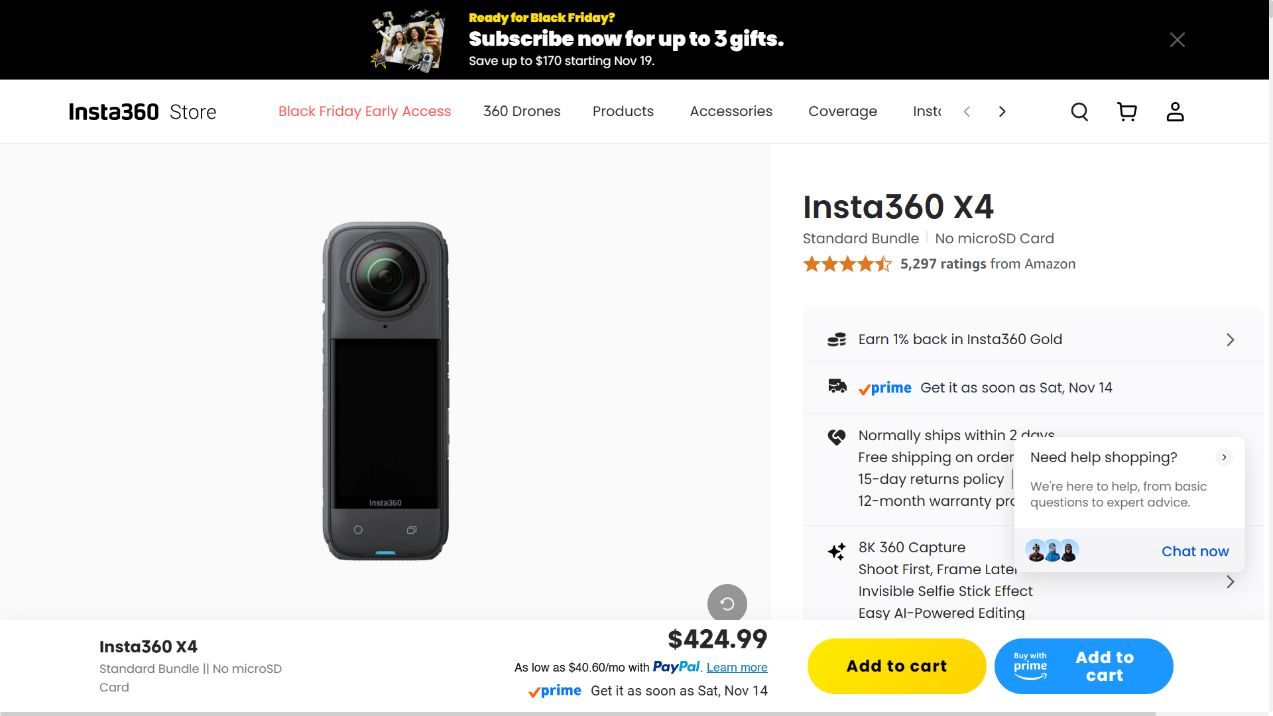
Source: Insta360 X4 store, observed on November 13, 2026.
A customer may know they want to film a motorcycle trip without knowing which clamp, pole or adapter they need to get the shot they have in mind. A product page that simply lists every available accessory leaves customers to figure that out for themselves. A page that recommends a kit takes on a different responsibility: it needs to make clear what is included, what is optional and which accessories are not compatible with one another.
Insta360’s public storefront is a useful example of how to approach this challenge.
Its X4 and Ace Pro 2 product pages combine activity-based selection, kit contents, shooting examples and compatibility information.
For a Shopify store, the main takeaway is how these elements help customers put together the right equipment for a specific activity, rather than simply choose a camera body.
This article examines Insta360’s US English storefront, with prices displayed in USD, as observed on November 13, 2026.
Prices, bundles, availability and service terms may vary by market and change over time.
The analysis is based on publicly accessible pages and does not involve access to Insta360’s administrative systems, sales figures or underlying implementation.
Why a Camera Body Is Only Part of the Buying Decision
Different hardware categories create different purchasing challenges.
When buying a charger, customers may mainly need to check its power output and cable compatibility.
With an action or 360 camera, they also need to understand how the equipment works together to produce the shots shown in the product demonstrations.
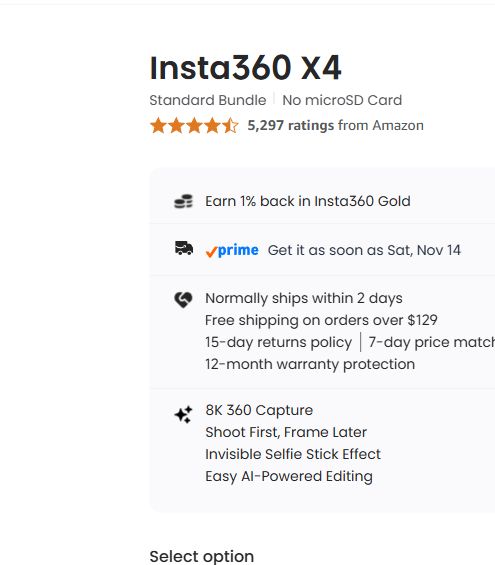
On the observed X4 page, the Standard Bundle was listed at $424.99.
That does not mean every accessory featured elsewhere on the page is included. A third-person perspective, for example, may require a suitable Invisible Selfie Stick, while mounting a camera on a helmet or handlebar calls for the appropriate mounting equipment.
Recording also requires a compatible microSD card, although customers who already own a suitable card do not necessarily need to purchase one from the store.
Software introduces another layer of questions.
Features such as “Shoot first, frame later,” stabilization and the invisible selfie stick effect are difficult to evaluate from feature names alone.
Customers need to understand how a shot is set up and see what the resulting footage actually looks like.
It is also important to distinguish between controlling a camera and processing its footage. A phone may be able to connect to a camera while still lacking the performance required for high-resolution editing or certain AI features.
Treating all aspects of app compatibility as a single yes-or-no question fails to explain where the actual limitations lie.
1. Organize Kits Around Activities Customers Already Understand
The Ace Pro 2 page’s Build Your Own Bundle entry point starts with activity selection.
In the interface observed, customers could select up to three activities.
This gives beginners a familiar starting point before asking them to make decisions about technical accessories.
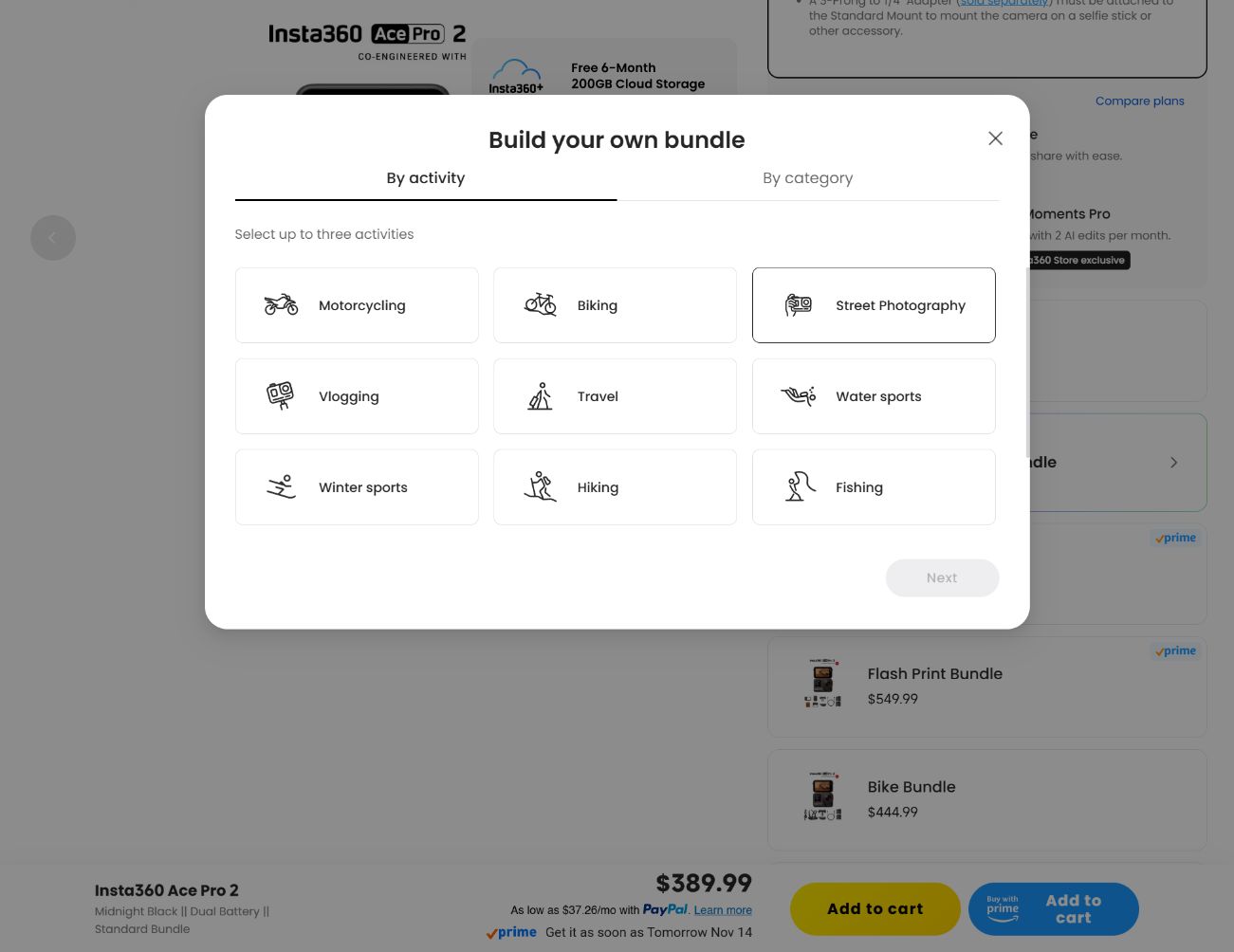
Source: Insta360 Ace Pro 2 store.
This shows the activity-selection step and does not provide evidence of the configurator’s back-end rules.
The X4 purchase page takes a similar approach through its named bundles.
The Standard Bundle description clearly identifies what is not included: a memory card is not provided, and a selfie stick must be purchased separately.
The page also distinguishes between everyday use and more demanding sports when discussing selfie sticks.
This is more helpful than leaving customers to assume that the camera body alone can reproduce every shot featured in the marketing materials.
The table below retains the detailed kit comparisons from the original analysis.
Prices reflect the observed pages at the time and should not be treated as a universal price list.
Where the X4 and Ace Pro 2 appear in the same row, customers should check the actual contents of the selected model rather than assume the two configurations are interchangeable.
| Activity or need | Bundle names and displayed prices in the source analysis | Contents and selection conditions to check |
|---|---|---|
|
Getting started and longer sessions |
Get-Set Bundle ($456); Starter Bundle ($469.99); Endurance Bundle ($571) |
Starter configurations introduce accessories such as a 114cm Invisible Selfie Stick and lens protection. Endurance configurations add items such as a spare battery, charging hub and carrying case. Always check the Includes list for the selected bundle. |
|
Motorcycle riding |
Motorcycle Multiview Bundle ($521); Motorcycle Ultimate Multiview Bundle ($651); BMW Motorrad Edition ($519.99) |
Compare the Action Invisible Selfie Stick, Heavy Duty Clamp and U-bolt mount rather than relying on the bundle name alone. The BMW edition’s advertised dashboard features apply to that specific edition and remain subject to its stated conditions. |
|
Road and mountain cycling |
Road Cycling Bundle, Integrated or Independent ($491); Bike Bundle ($511) |
The page explicitly warns that the Bike Computer Mount is not compatible with the Invisible Selfie Stick. A connection that appears physically similar does not necessarily mean two accessories can be connected in sequence. |
|
Skiing and winter activities |
Snowboard Bundle ($481); Ski Bundle ($515); Ace Pro 2 Winter Bundle |
Check which pole, ski mount or chest strap is included for the selected model. Ace Pro 2 accessory instructions may require a 3-prong to 1/4-inch adapter when connecting a selfie stick. |
|
Underwater 360 capture |
Invisible Dive Bundle ($575) |
Compare the Invisible Dive Case, pole and floating grip. Water changes the optical conditions involved in stitching 360 footage. Water resistance alone does not guarantee that footage captured underwater with the bare camera will stitch correctly. |
|
Elevated viewpoints and property work |
No Drone No Problem Bundle ($531); Virtual Tour Bundle ($484) |
The long pole provides an elevated viewpoint without requiring a drone. The property workflow references software including Floorfy, Realsee, Kuula, 3DVista, GoThru, immoviewer, OpenSpace and DroneDeploy. The current requirements of each service should still be checked separately. |
The cycling warning is particularly worth noting because of where it appears.
Rather than burying the restriction in an appendix at the bottom of the page, Insta360 places it close to the selection point where customers might otherwise make an incorrect assumption.
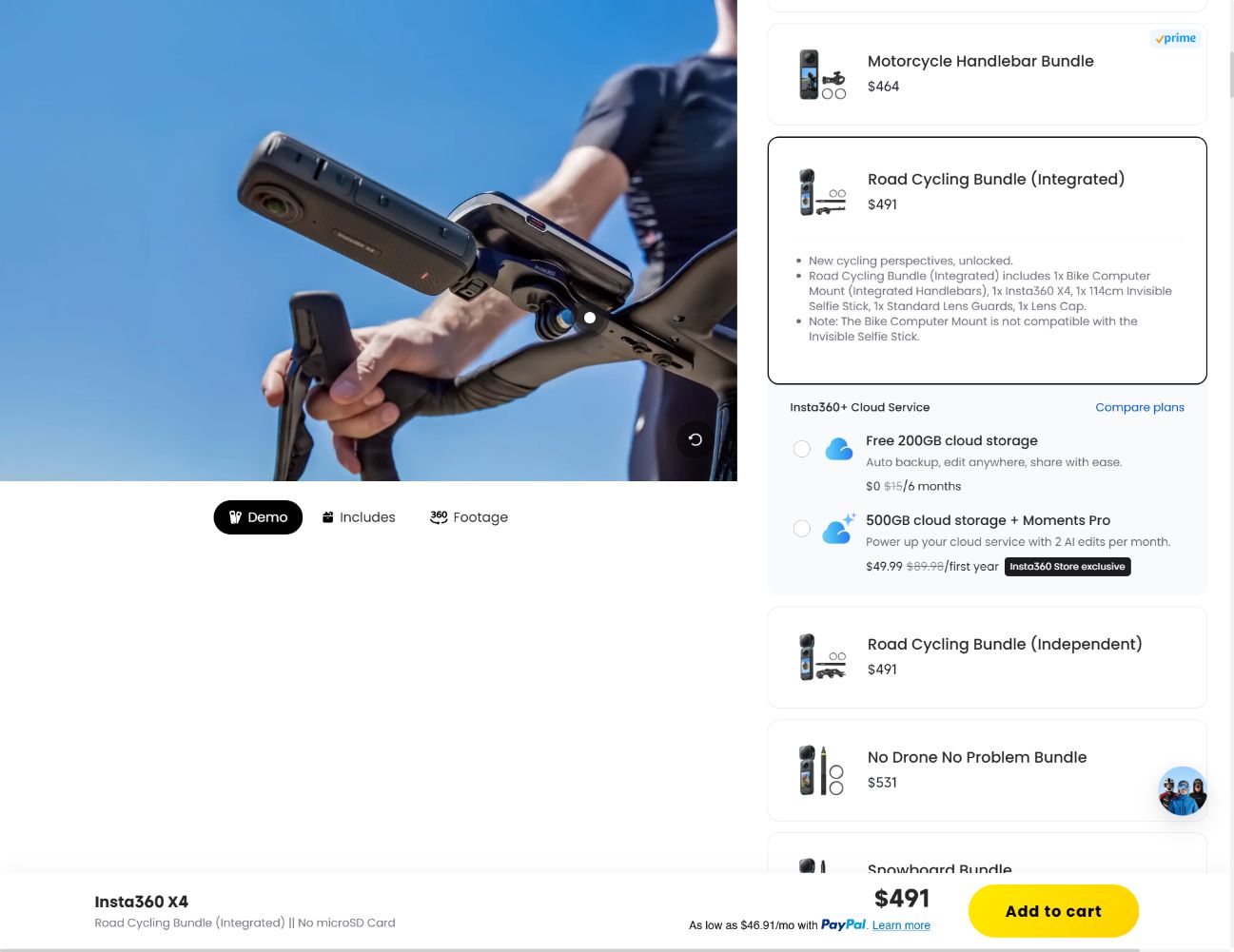
Source: X4 store.
The warning applies to the specified accessories and should not be interpreted as a general restriction covering every mount.
Separate Essential Equipment from Optional Services
After customers select a kit, the page offers additional storage and service options.
Although these appear close together in the buying process, they represent different types of purchases and should be explained separately.
The memory-card section included a No microSD Card option alongside optional cards, including a 128GB card displayed at $59.99. A suitable card is necessary for recording, but purchasing one from the store is optional if the customer already owns a card that meets the requirements.
The coverage section displayed FlexiCare and Extended Warranty options.
At the time of observation, FlexiCare was listed at $49.99 for two years, with four low-cost replacements advertised under its terms.
Replacement charges, eligibility requirements, exclusions and regional conditions all matter.
It would therefore be inaccurate to describe the service as unlimited free insurance.
The Extended Warranty option was also listed at $49.99, with the stated warranty period extended to two years.
The original analysis also records Insta360+ offers, including a six-month introductory option with 200GB of storage and a first-year 500GB offer priced at $49.99 against a displayed reference price of $89.98, along with advertised Moments Pro allowances.
These details relate to the specific offers displayed at the time.
They do not establish that every camera model, market or renewal carries the same benefits.
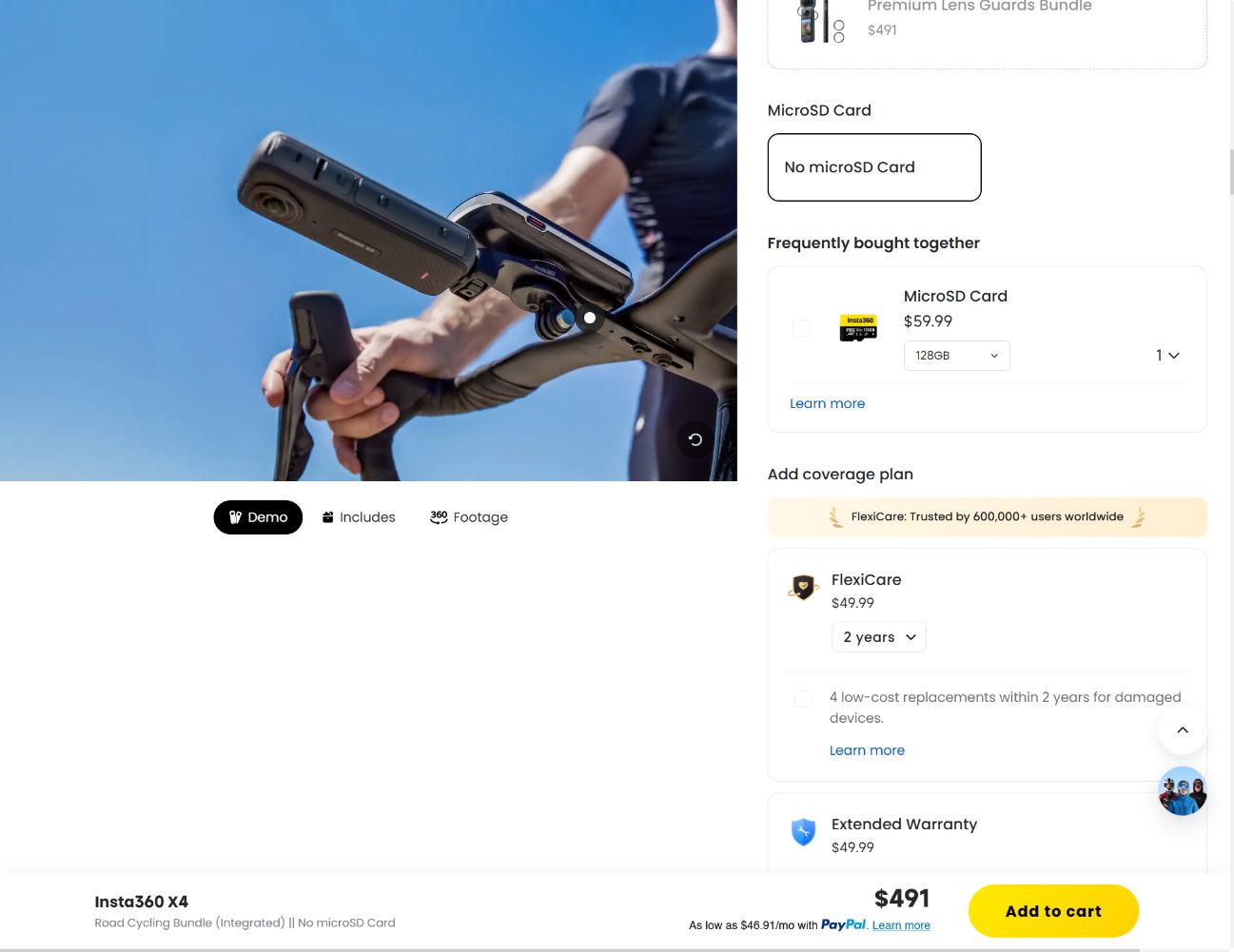
Source: X4 store.
Recording essentials, optional protection plans and cloud-service terms should be presented as separate purchasing decisions.
2. Make the Selected Kit Visible in the Media Area
The left-hand media area on the observed X4 page provides several ways to explore the product: a camera view with a rotation prompt, Includes, Footage and Intro.
Each serves a different purpose.
The rotation view helps customers inspect the physical device.
Includes explains what comes with the selected configuration.
Footage demonstrates how the camera performs in actual shooting scenarios, while Intro provides a broader product overview. A single generic hero image cannot effectively answer all four questions.
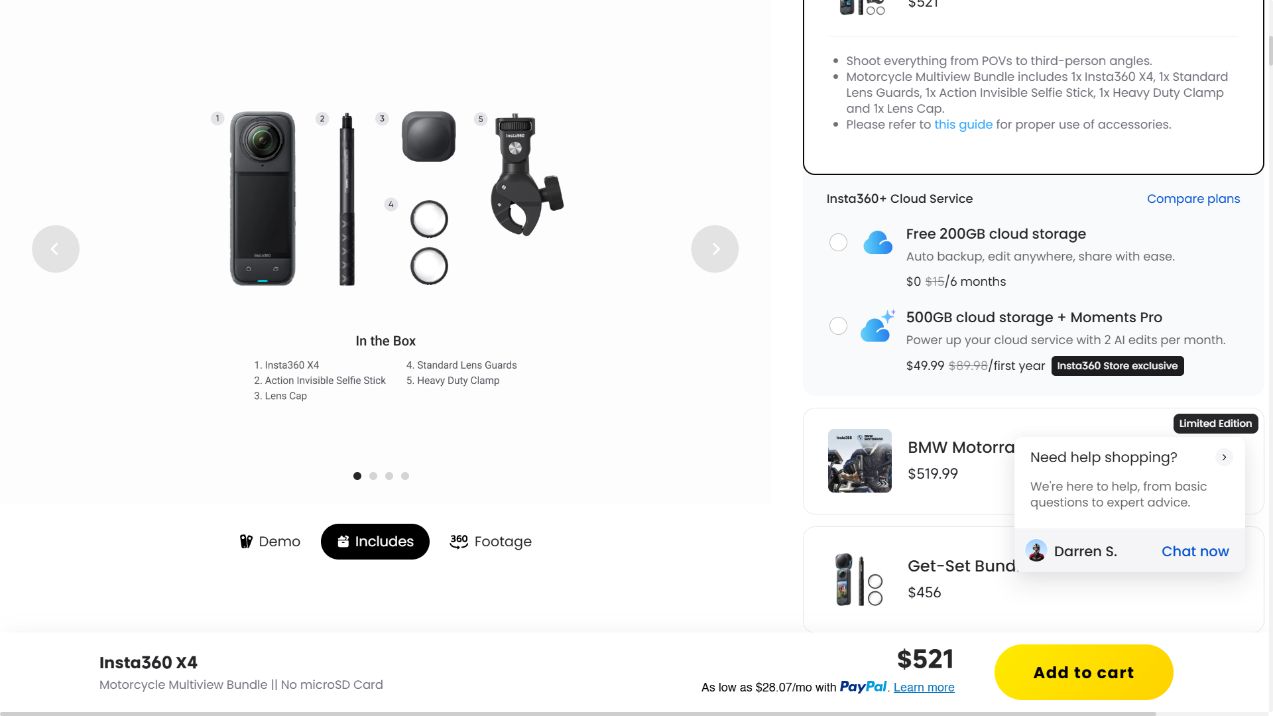
Source: X4 store.
This layout allows customers to inspect the camera, pole, lens cover and mounting components included in the selected configuration.
For a Shopify implementation, consistency is the key requirement.
When a customer changes the selected kit, the included-parts list, relevant images and videos, displayed price and eventual cart contents should all update accordingly.
Changing the heading while leaving the previous kit’s image on screen creates confusion at precisely the point when customers are trying to understand what they are buying.
3. Explain the Filming Method, Not Just the Finished Result
In the Overview section, REALITY and RESULT comparisons place the actual filming setup alongside the final image.
This helps customers understand why a selfie stick may be visible in one view but disappear from properly captured and stitched 360 footage.
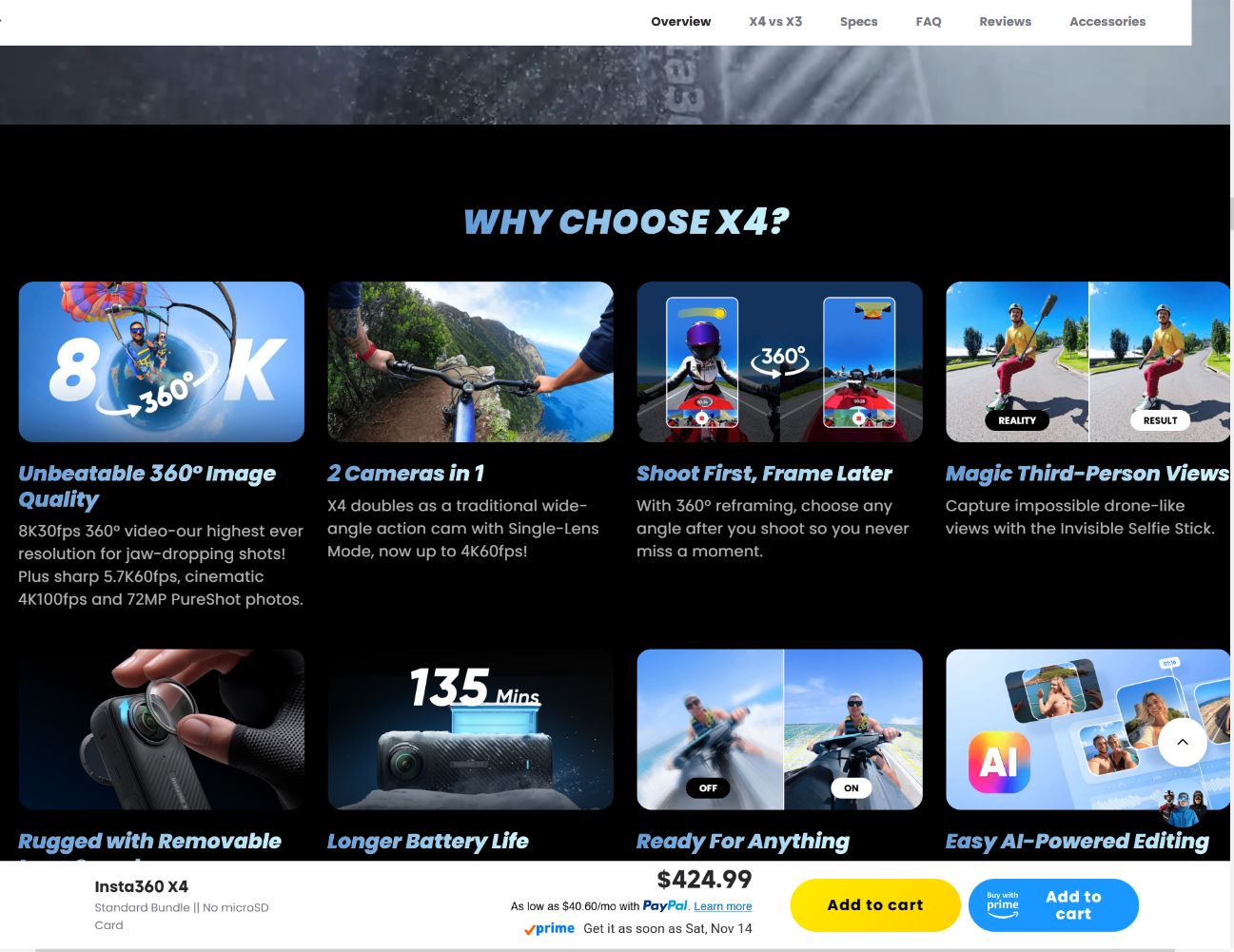
Source: X4 store.
The captured section presents a visual comparison.
It should not be described as an interactive toggle simply because two states are displayed side by side.
The broader page analysis also covers demonstrations involving stabilization, horizon lock, HDR, motion effects and underwater color processing.
Some sections and models use switchable media, while others present comparisons without an interactive control.
Descriptions should reflect the actual behavior available on the specific page being examined.
This is also an area where product pages can easily overpromise.
The invisible selfie stick effect depends on the capture method, mounting arrangement and supported equipment.
Demonstrating a feature does not guarantee that every customer’s setup will produce identical results. A more useful explanation presents the filming setup and its conditions alongside the finished footage.
4. Put Device Compatibility Restrictions Where Customers Can Find Them
Customer testimonials can help shoppers identify with a particular use case, but compatibility information answers a different question: will their existing equipment support the workflow they intend to use?
The observed X4 specifications distinguish between recommended device capabilities and more limited camera-control functionality.
The published compatibility information includes Apple A12 or newer processors and Android processor families such as Snapdragon 855, Kirin 990 and Exynos 2200 or higher, subject to the specific requirements listed.
It also identifies exclusions and installation conditions, including the SDM765 warning and a 64-bit system requirement.
Source: X4 store. This is a cropped excerpt.
The complete, current compatibility list should be checked before advising customers about a particular device.
Saying that a camera simply “works with phones” is too broad for this type of purchase.
Product pages should distinguish between connecting to and remotely controlling the camera, transferring footage, playback, editing and AI processing.
If a device limitation affects only one of these tasks, the page should identify that specific limitation.
Publicly available compatibility information can provide useful guidance when designing a product page.
However, it does not prove that a merchant has tested every device or achieved a reduction in product returns.
Bringing These Ideas into Shopify Without Mistaking a Prototype for a Working System
The original article includes a 733-line Liquid interface prototype, retained as an attachment so the complete source remains available.
The prototype updates selection text and displayed prices, but it does not yet implement actual variant selection, media switching, cart operations or service activation.
It should not be mistaken for a production-ready recreation of Insta360’s storefront.
A practical implementation can be divided into six stages:
-
Define the saleable products and variants.
In Shopify Products, verify the actual camera, kit and accessory variants, SKUs, inventory and sales-channel availability. A displayed label is not a substitute for a real variant ID.
-
Choose the appropriate inventory model. A separately stocked complete kit, a fixed bundle of components and a freely configurable multi-item purchase have different inventory-management and fulfillment implications.
Shopify’s bundle documentation explains when a bundles app is required.
-
Connect the selected configuration to its media.
Keep the included-parts image and explanation synchronized with the currently selected kit.
If relevant media is unavailable, display an honest fallback rather than showing an image of a different configuration.
-
Implement purchasing around the chosen inventory model.
The Cart Ajax API can add actual product variants to the cart.
Its response and a subsequent cart read should both be checked. A total calculated on the client side does not prove that the correct items or discounts have been added to checkout.
-
Handle services independently. Protection plans and subscriptions require proper eligibility checks and entitlement handling. A checkbox or cart-line property alone cannot activate a third-party protection plan or create a recurring subscription.
-
Test the complete purchasing journey. Check direct variant links, changes to selected configurations, inventory errors, repeated clicks and mobile controls.
Then verify order and fulfillment behavior through the store’s normal testing process.
Successfully adding an item to the cart does not prove that an order has been completed or that a service has been activated.
This connects directly to WESWOO’s broader approach to website design and development.
Product selection, media, product data, applications and order processing all need to describe and execute the same purchase. A more sophisticated front end is only useful when it reduces customer uncertainty without introducing inconsistencies elsewhere in the system.
Full source: 733-line original Liquid prototype.
The attachment remains a UI prototype and is subject to the limitations described above.
A Useful Next Comparison: Insta360, DJI and GoPro
These brands are natural candidates for a broader comparison of camera storefronts.
However, any comparison needs to account for the specific model, market and bundle being examined. A standard camera kit, a regional refurbished offer and a subscription-based offer cannot be compared directly on price alone.
| Brand and public store | Models discussed in the original analysis | Buying-path question for a separate comparison |
|---|---|---|
|
X4, X5 and Ace Pro 2 |
How do activity-based kits communicate differences in equipment and pricing? This article does not establish any actual improvement in the brand’s average order value. |
|
|
Osmo Action 5 Pro, Osmo Pocket 3 and Mavic/Mini families |
Compare standard and extended-use combinations, audio compatibility and Care terms for the selected product. The linked regional refurbished listing is not a universal DJI price reference, and no claims are made about order share. |
|
|
HERO13 Black with HB-Series lens choices, and MAX2 |
Examine how hardware, accessories and subscription benefits are presented together. Verify fees, replacement conditions and regional eligibility before describing any entitlement. Do not infer subscription revenue or customer lifetime value from the storefront presentation. |
For merchants, the best starting point is much smaller than attempting to replicate all of these systems.
Choose one real customer activity and identify the equipment needed to support it.
Make the included items and exclusions clear, connect the selection to the actual cart and verify what the warehouse and service provider receive.
Once that purchasing path works reliably, adding another activity becomes an extension of an existing system rather than the creation of another disconnected product card.
References
The storefront observations and Shopify implementation recommendations in this article are separate.
No claim is made that Insta360 uses Shopify or the proposed architecture.
No customer project, conversion experiment or production deployment was carried out as part of this analysis.
WESWOO — Shopify Storefront Development
We help Chinese brands expand internationally with storefront development and Shopify Plus integration services, supporting their cross-border commerce operations.
- Shopify storefront branding
- International UI design
- Multichannel social media marketing